<?xml version="1.0" encoding="utf-8"?><feed xmlns="http://www.w3.org/2005/Atom" ><generator uri="https://jekyllrb.com/" version="4.2.1">Jekyll</generator><link href="https://pixelambacht.nl/feed.xml" rel="self" type="application/atom+xml" /><link href="https://pixelambacht.nl/" rel="alternate" type="text/html" /><updated>2026-04-10T17:32:32+02:00</updated><id>https://pixelambacht.nl/feed.xml</id><title type="html">Pixelambacht</title><entry><title type="html">A new Wakamai Fondue</title><link href="https://pixelambacht.nl/2026/a-new-wakamai-fondue/" rel="alternate" type="text/html" title="A new Wakamai Fondue" /><published>2026-04-10T02:00:00+02:00</published><updated>2026-04-10T02:00:00+02:00</updated><id>https://pixelambacht.nl/2026/a-new-wakamai-fondue</id><content type="html" xml:base="https://pixelambacht.nl/2026/a-new-wakamai-fondue/"><![CDATA[<p>When I first discovered that a font could do <em>much more</em> than just plop drawings of letters on the screen, I felt like I’d been let in on a big secret. Characters could change their appearance, their position, the whole atmosphere of the text, all based on nearby characters or on features you could turn on and off. Magic!</p>

<p>But I also felt frustrated as to why this was so hidden. Why didn’t they just tell me all the cool things my font could do? Why would every new .ttf or .woff2 file make me ask myself, “what can my font do?”</p>

<p>I figured we needed something that would lift the curtains <em>and</em> hoods on fonts, and expose all the cool innards. So I took to the couch.</p>

<h2 id="prototype-more-like-amateurtotype-right">Prototype? More like amateurtotype, right?!</h2>

<p>While the TV showed a balloon-lipped lady declaring her eternal love for an unnecessarily shirtless macho man she met on a island just a few hours earlier, I flipped open the laptop on the couch next to my wife, and started a hunt for JavaScript-based tooling that could help me figure out what a font could do. I knew the amazing <a href="https://github.com/fonttools/fonttools">FontTools/TTX</a> and found a browser-compatible equivalent in <a href="https://github.com/foliojs/fontkit">Fontkit</a>. I just started tinkering with Vue, and before the aforementioned lady, now wearing a bikini made of at most 17 molecules, had moved on to her next soulmate because he had even less neck, I had a working prototype that dumped a list of a font’s OpenType features on the screen.</p>

<h2 id="wakamai-fondue-v10">Wakamai Fondue v1.0</h2>

<p>When the full prototype was released as Wakamai Fondue a few weeks into 2018, a lot of people found it useful. And I was happy! People were finally able to explore what their fonts could do. There was even proper CSS that you could just copy and paste and use. Fist bumps all around!</p>

<p>But it remained a prototype-turned-production thing. It was a bit messy, Fontkit didn’t allow me to dig deep enough sometimes, and there were improvements to make to the generated CSS.</p>

<p>So, immediately the plan was made to release a <em>proper</em> version.</p>

<h2 id="what-took-you-so-long">What took you so long</h2>

<p>Dave Crossland of Google Fonts offered to fund a proper release, with the code released to the public under an open source license. Being paid for this <em>and</em> making the source available for everyone made both my brain hemispheres high five eachother. I was going to make Wakamai Fondue so much better!</p>

<p>Then, <em>stuff</em> happened. A pandemic. The collapse of online social networks. Raising two little troublemakers. Leaving the stability of my employer to become an independent developer. The curse of having your JavaScript build system fail colossally from simply sitting untouched for a while. Stale code getting staler. Deranged lunatics at the wheel of the world. Bye bye motivation, it was nice knowing you.</p>

<h2 id="and-then">And then!!</h2>

<p>Somehow, I got back on my feet, dusted off the codebase with help of <a href="https://github.com/Wakamai-Fondue/wakamai-fondue-site/graphs/contributors">a few volunteers</a>, got rid of all the JavaScript/framework cobwebs, and started on finishing the better and newer features I started working on a few years earlier.</p>

<figure class="large-content-width">
	<img src="/img/wf-screenshot.jpg" alt="" />
    <figcaption>The new Wakamai Fondue homepage, looking suspiciously similar to the old one</figcaption>
</figure>

<h2 id="so-whats-cookin-good-lookin">So what’s cookin’, good lookin’?</h2>

<p>Okay then! So what <em>is</em> all this that’s so much better and newer and amazinger? In short:</p>

<ul>
  <li><strong>New Engine:</strong> We switched from FontKit to <a href="https://github.com/Pomax/lib-font">LibFont</a> for more reliable and detailed font analysis.</li>
  <li><strong>Better Reports:</strong> In-depth reports on all complexities of your font. The relevant CSS is shown for each and every thing your font can do, so it’s incredibly easy to use it on the web.</li>
  <li><strong>Better Testing:</strong> the fondue now features both a standard “word processor” style tester, as well as specialized tools to explore specifics, like all aspects of variable fonts, color fonts, and OpenType features.</li>
  <li><strong>Modern CSS Generation:</strong> you can now unlock the font’s full potential with customizable CSS output, at different complexity levels, all while using the <em>bestest</em> of best practices.</li>
</ul>

<p>There’s also a cool font to demonstrate the stuff Wakamai Fondue does, more metadata being reported on, better font size control, a categorized character map, you can now drop a font <em>anywhere</em>, and <em>lots</em> of other small improvements.</p>

<p>Please do check it out at <a href="https://www.wakamaifondue.com/">wakamaifondue.com</a>!</p>

<p>I will do a proper guide through the new stuff soon, but until then, please give the new version a spin and let me know if anything’s off. Or on! I love to hear it all.</p>

<p>And remember, if you ever wonder “what can my font do?”, use Wakamai Fondue!</p>]]></content><author><name></name></author><category term="webfonts," /><category term="variable" /><category term="fonts," /><category term="wakamai" /><category term="fondue" /><summary type="html"><![CDATA[When I first discovered that a font could do much more than just plop drawings of letters on the screen, I felt like I’d been let in on a big secret. Characters could change their appearance, their position, the whole atmosphere of the text, all based on nearby characters or on features you could turn on and off. Magic!]]></summary></entry><entry><title type="html">Boiled down: fixing the variable font inheritance problem</title><link href="https://pixelambacht.nl/2022/boiled-down-fixing-variable-font-inheritance/" rel="alternate" type="text/html" title="Boiled down: fixing the variable font inheritance problem" /><published>2022-09-07T02:00:00+02:00</published><updated>2022-09-07T02:00:00+02:00</updated><id>https://pixelambacht.nl/2022/boiled-down-fixing-variable-font-inheritance</id><content type="html" xml:base="https://pixelambacht.nl/2022/boiled-down-fixing-variable-font-inheritance/"><![CDATA[<p>Both <code class="language-plaintext highlighter-rouge">font-feature-settings</code> and <code class="language-plaintext highlighter-rouge">font-variation-settings</code> take a list of font properties. The caveat is that every property you <em>don’t set</em> will be set to it’s default value. This makes it hard to change one setting without unsetting the rest. But luckily CSS variables can be used to fix this problem!</p>

<p>In the following example the weight will be set to 100 and the width to 50%, resulting in “Hello world” being rendered in a narrow bold style:</p>

<figure class="highlight"><pre><code class="language-html" data-lang="html"><span class="nt">&lt;style&gt;</span>
<span class="nc">.a</span> <span class="p">{</span>
    <span class="py">font-variation-settings</span><span class="p">:</span> <span class="s1">"wdth"</span> <span class="m">50</span><span class="p">,</span> <span class="s1">"wght"</span> <span class="m">700</span><span class="p">;</span>
<span class="p">}</span>
<span class="nt">&lt;/style&gt;</span>

<span class="nt">&lt;div</span> <span class="na">class=</span><span class="s">"a"</span><span class="nt">&gt;</span>
    Hello world
<span class="nt">&lt;/div&gt;</span></code></pre></figure>

<p>But in this case “Hello world” will be rendered in a narrow <em>regular</em> style:</p>

<figure class="highlight"><pre><code class="language-html" data-lang="html"><span class="nt">&lt;style&gt;</span>
<span class="nc">.a</span> <span class="p">{</span>
    <span class="py">font-variation-settings</span><span class="p">:</span> <span class="s1">"wght"</span> <span class="m">700</span><span class="p">;</span>
<span class="p">}</span>
<span class="nc">.b</span> <span class="p">{</span>
    <span class="py">font-variation-settings</span><span class="p">:</span> <span class="s1">"wdth"</span> <span class="m">50</span><span class="p">;</span>
<span class="p">}</span>
<span class="nt">&lt;/style&gt;</span>

<span class="nt">&lt;div</span> <span class="na">class=</span><span class="s">"a"</span><span class="nt">&gt;</span>
    <span class="nt">&lt;div</span> <span class="na">class=</span><span class="s">"b"</span><span class="nt">&gt;</span>
        Hello world
    <span class="nt">&lt;/div&gt;</span>
<span class="nt">&lt;/div&gt;</span></code></pre></figure>

<p>The reason is that class <code class="language-plaintext highlighter-rouge">b</code> will overwrite everything set in class <code class="language-plaintext highlighter-rouge">a</code>. The browser doesn’t say “the weight was set to 700 earlier, so I’ll just inherit that”. It says, “weight is not set, so I’ll use the default value of 400”.</p>

<p>To prevent this you can use CSS variables to keep track of each value, as they will cascade down nicely:</p>

<figure class="highlight"><pre><code class="language-html" data-lang="html"><span class="nt">&lt;style&gt;</span>
<span class="nc">.a</span><span class="o">,</span> <span class="nc">.b</span> <span class="p">{</span>
    <span class="c">/* Default values */</span>
    <span class="py">--wght</span><span class="p">:</span> <span class="m">400</span><span class="p">;</span>
    <span class="py">--wdth</span><span class="p">:</span> <span class="m">100</span><span class="p">;</span>
    <span class="py">font-variation-settings</span><span class="p">:</span>
        <span class="s1">"wght"</span> <span class="n">var</span><span class="p">(</span><span class="n">--wght</span><span class="p">),</span>
        <span class="s1">"wdth"</span> <span class="n">var</span><span class="p">(</span><span class="n">--wdth</span><span class="p">);</span>
<span class="p">}</span>
<span class="nc">.a</span> <span class="p">{</span>
    <span class="c">/* Override just the "wght" */</span>
    <span class="py">--wght</span><span class="p">:</span> <span class="m">700</span><span class="p">;</span>
<span class="p">}</span>
<span class="nc">.b</span> <span class="p">{</span>
    <span class="c">/* Overwrite just the "wdth" */</span>
    <span class="py">--wdth</span><span class="p">:</span> <span class="m">50</span><span class="p">;</span>
<span class="p">}</span>
<span class="nt">&lt;/style&gt;</span>

<span class="nt">&lt;div</span> <span class="na">class=</span><span class="s">"a"</span><span class="nt">&gt;</span>
    <span class="nt">&lt;div</span> <span class="na">class=</span><span class="s">"b"</span><span class="nt">&gt;</span>
        Hello world
    <span class="nt">&lt;/div&gt;</span>
<span class="nt">&lt;/div&gt;</span></code></pre></figure>

<p>Now “Hello world” will be rendered in a narrow bold style, like you’d expect. Every change in a CSS variable’s value will trickle down and be used whenever <code class="language-plaintext highlighter-rouge">font-variation-settings</code> gets applied.</p>

<p>Note that you normally don’t need to use <code class="language-plaintext highlighter-rouge">font-feature-settings</code> or <code class="language-plaintext highlighter-rouge">font-variation-settings</code>. In our example you should use <code class="language-plaintext highlighter-rouge">font-weight</code> and <code class="language-plaintext highlighter-rouge">font-stretch</code> instead of manipulating the axes directly. Most OpenType features can be set through <a href="https://developer.mozilla.org/en-US/docs/Web/CSS/font-variant"><code class="language-plaintext highlighter-rouge">font-variant</code></a>. If you <em>do</em> need access to low level features (for animations, specimen sites, custom axes, etc.), using CSS variables is a good way to fix the inheritance problem.</p>

<div class="note">
    There's also a more verbose and beginner-friendly version of this article: <a href="/2019/fixing-variable-font-inheritance/">Boiling eggs and fixing the variable font inheritance problem</a>.
</div>]]></content><author><name></name></author><category term="webfonts," /><category term="variable" /><category term="fonts" /><summary type="html"><![CDATA[Both font-feature-settings and font-variation-settings take a list of font properties. The caveat is that every property you don’t set will be set to it’s default value. This makes it hard to change one setting without unsetting the rest. But luckily CSS variables can be used to fix this problem!]]></summary></entry><entry><title type="html">Optical size, the hidden superpower of variable fonts</title><link href="https://pixelambacht.nl/2021/optical-size-hidden-superpower/" rel="alternate" type="text/html" title="Optical size, the hidden superpower of variable fonts" /><published>2021-06-17T02:00:00+02:00</published><updated>2021-06-17T02:00:00+02:00</updated><id>https://pixelambacht.nl/2021/optical-size-hidden-superpower</id><content type="html" xml:base="https://pixelambacht.nl/2021/optical-size-hidden-superpower/"><![CDATA[<p>Variable fonts have a hidden superpower that just not enough people are raving about. This feature will make letters actually <em>change the way they look</em> when shown in small or large sizes. It all happens automatically in the browser. All you need is a variable font with an optical size axis!</p>

<h2 id="but-first-why-do-we-need-different-designs-for-different-sizes">But first: why do we need different designs for different sizes?</h2>

<p>When a graphical element needs to be bigger, you can basically do two things: scale it up, or redraw it. Scaling is the simplest solution, but doesn’t always look right. Take this mushroom from a fictional videogame. Here it is drawn at 8×8 pixels, the original size it appears in the game:</p>

<figure class="center">
	<img src="/img/opsz-mushroom-8-org.png" alt="An 8x8 pixel mushroom" />
</figure>

<p>Cute! But now the player shoots ultrasonic ninjalasers at the mushroom, which makes it grow three times as big. We could simply scale up our mushroom:</p>

<figure class="center">
	<img src="/img/opsz-mushroom-8-big.png" alt="An 8x8 pixel mushroom scaled up" />
</figure>

<p>But this doesn’t look quite right. We have more canvas to work with, so let’s use it to add detail and refine the design:</p>

<figure class="center">
	<img src="/img/opsz-mushroom-8-bigger.png" alt="An 32x32 pixel mushroom" />
</figure>

<p>The mushroom design adjusts to its size: it gains detail when it gets bigger. This makes sure the design works at small sizes, and at large sizes:</p>

<figure class="center">
	<img src="/img/opsz-mushroom-1.png" alt="An 8x8, 16x16 and 32x32 pixel mushroom" />
</figure>

<p>This principle doesn’t only work for videogame mushrooms. It works for typography too!</p>

<h2 id="why-isnt-scaling-good-enough-for-fonts">Why isn’t scaling good enough for fonts?</h2>

<p>Fonts are vector graphics and they’ll keep looking good when scaled up. This is true — but the <em>level of detail</em> remains the same at all sizes. This means a design meant for small sizes can look chunky and crude at large sizes. Or a design meant for large sizes can look convoluted and finicky at small sizes.</p>

<p>Size-specific design has been around for a long time in typography. Nick Sherman <a href="https://alistapart.com/column/font-hinting-and-the-future-of-responsive-typography/#section5">wrote about this</a> before:</p>

<blockquote>
  <p>The idea of modifying a typeface’s letterforms for different situations is nothing new. As far back as Gutenberg, each size of a letterpress typeface has traditionally featured “optical size” variations that altered the spacing, proportions, weight, and other details for optimal results. This concept has been applied to some digital typefaces that are offered as “Text” and “Display” versions, for example.</p>
</blockquote>

<p>This is illustrated in this image of the letter <code class="language-plaintext highlighter-rouge">a</code> in the Century Expanded typeface. Each <code class="language-plaintext highlighter-rouge">a</code> is printed at a different size and then scaled so you can see the change in detail:</p>

<figure class="large-content-width">
	<img src="/img/Century_Expanded-a-normalized.jpeg" alt="" />
	<figcaption>
		"Each size of Century Expanded as it existed in analog metal form had design variations to maintain stylistic traits at different sizes, compensate for technical printing issues, and improve readability."
	</figcaption>
</figure>

<p>If you want to recreate this for the web, you’d need 11 different font files of the same typeface, each one representing a specific optical size. Oof. That’s a lot of files.</p>

<p>So, enter variable fonts. If a variable font has an <code class="language-plaintext highlighter-rouge">opsz</code> axis, it means its design will change depending on the size it’s used at. Just like that! The browser and the font work this out completely automatically.</p>

<h2 id="how-does-this-look-in-practice">How does this look in practice?</h2>

<p>For both <a href="https://arapey.xyz/">Aparey</a> and <a href="https://fraunces.undercase.xyz/">Fraunces</a> we created a specimen site that showcase the difference between text <em>with</em> and <em>without</em> optical size:</p>

<figure class="large-content-width">
    <video controls="" loop="" autoplay="" muted="" width="100%">
        <source src="/img/opsz.mp4" type="video/mp4" />
        Sorry, your browser doesn't support embedded videos.
    </video>
    <figcaption>
      Fraunces with appropriate optical sizing on the left, without optical sizing on the right.
    </figcaption>
</figure>

<p>I found these differences quite dramatic when I first saw them, especially on the smaller text. YMMV on that, but hot dang — the text with optical sizing looks so much better!</p>

<p>Here’s a simple demo so you can look at how an individual letter changes. It’s using the <a href="https://fraunces.undercase.xyz/">Fraunces</a> typeface. Edit the letter in the box to see how <em>your</em> favorite character changes its optical sizing!</p>

<p class="codepen" data-height="543" data-theme-id="light" data-default-tab="result" data-user="RoelN" data-slug-hash="oNZmaam" style="height: 543px; box-sizing: border-box; display: flex; align-items: center; justify-content: center; border: 2px solid; margin: 1em 0; padding: 1em;" data-pen-title="Optical sizing demo">
  <span>See the Pen <a href="https://codepen.io/RoelN/pen/oNZmaam">
  Optical sizing demo</a> by PixelAmbacht (<a href="https://codepen.io/RoelN">@RoelN</a>)
  on <a href="https://codepen.io">CodePen</a>.</span>
</p>
<script async="" src="https://cpwebassets.codepen.io/assets/embed/ei.js"></script>

<h2 id="the-css-you-dont-need-to-write">The CSS you don’t need to write</h2>

<p>The browser will apply the right optical size out of the box. If for some reason you want this turned off, you can use <code class="language-plaintext highlighter-rouge">font-optical-sizing: none</code> (<code class="language-plaintext highlighter-rouge">auto</code> is the default value). This will make all font sizes use the font’s default design.</p>

<p>If you want to control the optical size independent from the font size, you can set values for the <code class="language-plaintext highlighter-rouge">opsz</code> axis directly. Say a font has an optical size range from 16 to 64, you can set it to the maximum value like so: <code class="language-plaintext highlighter-rouge">font-variation-settings: 'opsz' 64</code>.</p>

<p>But unless you’re deliberately breaking typography and design rules, the font-size-to-optical-size thing the browser does should be your best option.</p>

<h2 id="go-forth-and-picketh-fonts-with-optical-sizeths">Go forth and picketh fonts with optical sizeths</h2>

<p>A font with an optical size axis will make itself look <em>better</em> for the size it’s used at. It does so automatically, in collaboration with the browser or the operating system. You don’t have to do anything yourself — except use a font with an optical size axis!</p>

<p class="note">
Special megathanks to <a href="https://twitter.com/_Luuuuke">Luke Coe</a> for letting me use his pixel mushroom. Go check out his other artwork!
<br /><br />
In this <a href="https://twitter.com/PixelAmbacht/status/1380429507295854595">Twitter thread</a> I asked how to best explain what optical size is, and a lot of smart folks have given great examples. Check this out if you want to learn more.
</p>]]></content><author><name></name></author><category term="variable" /><category term="fonts," /><category term="css" /><summary type="html"><![CDATA[Variable fonts have a hidden superpower that just not enough people are raving about. This feature will make letters actually change the way they look when shown in small or large sizes. It all happens automatically in the browser. All you need is a variable font with an optical size axis!]]></summary></entry><entry><title type="html">Wakamai Fondue on the command line: never write font CSS again!</title><link href="https://pixelambacht.nl/2021/wakamai-fondue-command-line/" rel="alternate" type="text/html" title="Wakamai Fondue on the command line: never write font CSS again!" /><published>2021-02-11T01:00:00+01:00</published><updated>2021-02-11T01:00:00+01:00</updated><id>https://pixelambacht.nl/2021/wakamai-fondue-command-line</id><content type="html" xml:base="https://pixelambacht.nl/2021/wakamai-fondue-command-line/"><![CDATA[<p>Did you know? Wakamai Fondue is also command line tool! You can use it to generate <em>all the CSS</em> for all your fonts. No need to head over to the website, drag’n’drop your font, click the “Download stylesheet” button, save the file, and all that hassle. Just type <code class="language-plaintext highlighter-rouge">wakamai-fondue -c MyFont.woff2</code> and the CSS will flood your terminal window! Bleep bloop!</p>

<h2 id="installing-the-fondue">Installing the fondue</h2>

<p>Make sure you have <code class="language-plaintext highlighter-rouge">npm</code> running on your system. If you do any kind of modern browser computing, this is probably already the case. If not, head over <a href="https://www.npmjs.com/get-npm">here</a>.</p>

<p>Install Wakamai Fondue from the terminal as follows:</p>

<div class="language-sh highlighter-rouge"><div class="highlight"><pre class="highlight"><code><span class="nv">$ </span>npm <span class="nt">-g</span> <span class="nb">install</span> @wakamai-fondue/cli
</code></pre></div></div>

<p>This will make Wakamai Fondue globally available on your system!</p>

<h2 id="using-the-fondue">Using the fondue</h2>

<p>As a responsible citizen of cyberspace, you obviously want to take a minute and sit down comfortably to read the manual. This can be done with <code class="language-plaintext highlighter-rouge">wakamai-fondue -h</code> and it will tell you something like:</p>

<div class="language-plaintext highlighter-rouge"><div class="highlight"><pre class="highlight"><code>Usage: wakamai-fondue [options] &lt;file&gt;

Options:
  -V, --version  output the version number
  -c, --css      Generate CSS
  -j, --json     Dump info about font in JSON format
  -h, --help     display help for command
</code></pre></div></div>

<p>Great! With all this information injected into your brain hemispheres, it’s time to actually get some work done. Let’s feed it a font, for instance the variable font <a href="https://recursive.design/">Recursive</a>!</p>

<div class="language-sh highlighter-rouge"><div class="highlight"><pre class="highlight"><code><span class="nv">$ </span>wakamai-fondue <span class="nt">-c</span> Recursive_VF_1.072.woff2
</code></pre></div></div>

<p>This will output all the CSS for your font directly to your terminal. If you’d rather save it to a file, you can do so by adding <code class="language-plaintext highlighter-rouge">&gt; filename.css</code>:</p>

<div class="language-sh highlighter-rouge"><div class="highlight"><pre class="highlight"><code><span class="nv">$ </span>wakamai-fondue <span class="nt">-c</span> Recursive_VF_1.072.woff2 <span class="o">&gt;</span> recursive.css
</code></pre></div></div>

<p>You will now have a file on your computer called <code class="language-plaintext highlighter-rouge">recursive.css</code> and it will contain all the CSS you need to use the OpenType layout features <em>and</em> variable instances of the Recursive font.</p>

<h2 id="whats-in-the-css">What’s in the CSS?</h2>

<p>The CSS is the same as the Wakamai Fondue site will produce. This is because the CLI tool uses the same “engine”. The <a href="https://github.com/Wakamai-Fondue/wakamai-fondue-engine">Wakamai Fondue Engine</a> is powered by the awesome <a href="https://github.com/Pomax/lib-font">LibFont</a> library, and provides some more human friendly data based on the raw font data.</p>

<p>So let’s look at <code class="language-plaintext highlighter-rouge">recursive.css</code> and quickly go through what CSS is generated for you. The idea is that you keep whatever you need, and throw away whatcha don’t.</p>

<p>First up is the <code class="language-plaintext highlighter-rouge">@font-face</code> rule:</p>

<div class="language-css highlighter-rouge"><div class="highlight"><pre class="highlight"><code><span class="c">/**
 * CSS for Recursive Sans Linear Light
 * Generated by Wakamai Fondue - https://wakamaifondue.com
 * by Roel Nieskens/PixelAmbacht - https://pixelambacht.nl
 */</span>

<span class="k">@font-face</span> <span class="p">{</span>
    <span class="nl">font-family</span><span class="p">:</span> <span class="s1">"Recursive Sans Linear Light"</span><span class="p">;</span>
    <span class="nl">src</span><span class="p">:</span> <span class="sx">url("Recursive_VF_1.072.woff2")</span><span class="p">;</span>
    <span class="nl">font-weight</span><span class="p">:</span> <span class="m">300</span> <span class="m">1000</span><span class="p">;</span>
    <span class="py">unicode-range</span><span class="p">:</span> <span class="n">U</span><span class="err">+</span><span class="m">000</span><span class="n">D</span><span class="p">,</span> <span class="n">U</span><span class="err">+</span><span class="m">0020-007</span><span class="n">E</span><span class="p">,</span> <span class="n">U</span><span class="err">+</span><span class="m">00</span><span class="n">A0-017E</span><span class="p">,</span> <span class="n">U</span><span class="err">+</span><span class="m">018</span><span class="n">F</span><span class="p">,</span> <span class="n">U</span><span class="err">+</span><span class="m">0192</span><span class="p">,</span> <span class="n">U</span><span class="err">+</span><span class="m">019</span><span class="n">D</span><span class="p">,</span>
        <span class="n">U</span><span class="err">+</span><span class="m">01</span><span class="n">A0-01A1</span><span class="p">,</span> <span class="n">U</span><span class="err">+</span><span class="m">01</span><span class="n">AF-01B0</span><span class="p">,</span> <span class="n">U</span><span class="err">+</span><span class="m">01</span><span class="n">C4-01CC</span><span class="p">,</span> <span class="n">U</span><span class="err">+</span><span class="m">01</span><span class="n">E6-01E7</span><span class="p">,</span> <span class="n">U</span><span class="err">+</span><span class="m">01</span><span class="n">EA-01EB</span><span class="p">,</span>
        <span class="n">U</span><span class="err">+</span><span class="m">01</span><span class="n">F1-01F3</span><span class="p">,</span> <span class="n">U</span><span class="err">+</span><span class="m">01</span><span class="n">FA-021B</span><span class="p">,</span> <span class="n">U</span><span class="err">+</span><span class="m">022</span><span class="n">A-022D</span><span class="p">,</span> <span class="n">U</span><span class="err">+</span><span class="m">0230-0233</span><span class="p">,</span> <span class="n">U</span><span class="err">+</span><span class="m">0237</span><span class="p">,</span> <span class="n">U</span><span class="err">+</span><span class="m">0259</span><span class="p">,</span>
        <span class="n">U</span><span class="err">+</span><span class="m">0272</span><span class="p">,</span> <span class="n">U</span><span class="err">+</span><span class="m">02</span><span class="n">B9-02BC</span><span class="p">,</span> <span class="n">U</span><span class="err">+</span><span class="m">02</span><span class="n">BE-02BF</span><span class="p">,</span> <span class="n">U</span><span class="err">+</span><span class="m">02</span><span class="n">C6-02CC</span><span class="p">,</span> <span class="n">U</span><span class="err">+</span><span class="m">02</span><span class="n">D8-02DD</span><span class="p">,</span>
        <span class="n">U</span><span class="err">+</span><span class="m">0300-0304</span><span class="p">,</span> <span class="n">U</span><span class="err">+</span><span class="m">0306-030</span><span class="n">C</span><span class="p">,</span> <span class="n">U</span><span class="err">+</span><span class="m">030</span><span class="n">F</span><span class="p">,</span> <span class="n">U</span><span class="err">+</span><span class="m">0311-0312</span><span class="p">,</span> <span class="n">U</span><span class="err">+</span><span class="m">0315</span><span class="p">,</span> <span class="n">U</span><span class="err">+</span><span class="m">031</span><span class="n">B</span><span class="p">,</span>
        <span class="n">U</span><span class="err">+</span><span class="m">0323-0328</span><span class="p">,</span> <span class="n">U</span><span class="err">+</span><span class="m">032</span><span class="n">E</span><span class="p">,</span> <span class="n">U</span><span class="err">+</span><span class="m">0331</span><span class="p">,</span> <span class="n">U</span><span class="err">+</span><span class="m">0335</span><span class="p">,</span> <span class="n">U</span><span class="err">+</span><span class="m">03</span><span class="n">C0</span><span class="p">,</span> <span class="n">U</span><span class="err">+</span><span class="m">0</span><span class="n">E3F</span><span class="p">,</span> <span class="n">U</span><span class="err">+</span><span class="m">1</span><span class="n">E08-1E09</span><span class="p">,</span>
        <span class="n">U</span><span class="err">+</span><span class="m">1</span><span class="n">E0C-1E0F</span><span class="p">,</span> <span class="n">U</span><span class="err">+</span><span class="m">1</span><span class="n">E14-1E17</span><span class="p">,</span> <span class="n">U</span><span class="err">+</span><span class="m">1</span><span class="n">E1C-1E1D</span><span class="p">,</span> <span class="n">U</span><span class="err">+</span><span class="m">1</span><span class="n">E20-1E21</span><span class="p">,</span> <span class="n">U</span><span class="err">+</span><span class="m">1</span><span class="n">E24-1E25</span><span class="p">,</span>
        <span class="n">U</span><span class="err">+</span><span class="m">1</span><span class="n">E2A-1E2B</span><span class="p">,</span> <span class="n">U</span><span class="err">+</span><span class="m">1</span><span class="n">E2E-1E2F</span><span class="p">,</span> <span class="n">U</span><span class="err">+</span><span class="m">1</span><span class="n">E36-1E37</span><span class="p">,</span> <span class="n">U</span><span class="err">+</span><span class="m">1</span><span class="n">E3A-1E3B</span><span class="p">,</span> <span class="n">U</span><span class="err">+</span><span class="m">1</span><span class="n">E42-1E49</span><span class="p">,</span>
        <span class="n">U</span><span class="err">+</span><span class="m">1</span><span class="n">E4C-1E53</span><span class="p">,</span> <span class="n">U</span><span class="err">+</span><span class="m">1</span><span class="n">E5A-1E5B</span><span class="p">,</span> <span class="n">U</span><span class="err">+</span><span class="m">1</span><span class="n">E5E-1E69</span><span class="p">,</span> <span class="n">U</span><span class="err">+</span><span class="m">1</span><span class="n">E6C-1E6F</span><span class="p">,</span> <span class="n">U</span><span class="err">+</span><span class="m">1</span><span class="n">E78-1E7B</span><span class="p">,</span>
        <span class="n">U</span><span class="err">+</span><span class="m">1</span><span class="n">E80-1E85</span><span class="p">,</span> <span class="n">U</span><span class="err">+</span><span class="m">1</span><span class="n">E8E-1E8F</span><span class="p">,</span> <span class="n">U</span><span class="err">+</span><span class="m">1</span><span class="n">E92-1E93</span><span class="p">,</span> <span class="n">U</span><span class="err">+</span><span class="m">1</span><span class="n">E97</span><span class="p">,</span> <span class="n">U</span><span class="err">+</span><span class="m">1</span><span class="n">E9E</span><span class="p">,</span> <span class="n">U</span><span class="err">+</span><span class="m">1</span><span class="n">EA0-1EF9</span><span class="p">,</span>
        <span class="n">U</span><span class="err">+</span><span class="m">2007-200</span><span class="n">B</span><span class="p">,</span> <span class="n">U</span><span class="err">+</span><span class="m">2010</span><span class="p">,</span> <span class="n">U</span><span class="err">+</span><span class="m">2012-2015</span><span class="p">,</span> <span class="n">U</span><span class="err">+</span><span class="m">2018-201</span><span class="n">A</span><span class="p">,</span> <span class="n">U</span><span class="err">+</span><span class="m">201</span><span class="n">C-201E</span><span class="p">,</span>
        <span class="n">U</span><span class="err">+</span><span class="m">2020-2022</span><span class="p">,</span> <span class="n">U</span><span class="err">+</span><span class="m">2026</span><span class="p">,</span> <span class="n">U</span><span class="err">+</span><span class="m">2030</span><span class="p">,</span> <span class="n">U</span><span class="err">+</span><span class="m">2032-2033</span><span class="p">,</span> <span class="n">U</span><span class="err">+</span><span class="m">2039-203</span><span class="n">A</span><span class="p">,</span> <span class="n">U</span><span class="err">+</span><span class="m">203</span><span class="n">E</span><span class="p">,</span> <span class="n">U</span><span class="err">+</span><span class="m">2044</span><span class="p">,</span>
        <span class="n">U</span><span class="err">+</span><span class="m">2052</span><span class="p">,</span> <span class="n">U</span><span class="err">+</span><span class="m">2070</span><span class="p">,</span> <span class="n">U</span><span class="err">+</span><span class="m">2074-2079</span><span class="p">,</span> <span class="n">U</span><span class="err">+</span><span class="m">2080-2089</span><span class="p">,</span> <span class="n">U</span><span class="err">+</span><span class="m">20</span><span class="n">A1</span><span class="p">,</span> <span class="n">U</span><span class="err">+</span><span class="m">20</span><span class="n">A6</span><span class="p">,</span> <span class="n">U</span><span class="err">+</span><span class="m">20</span><span class="n">A8-20AD</span><span class="p">,</span>
        <span class="n">U</span><span class="err">+</span><span class="m">20</span><span class="n">B1-20B2</span><span class="p">,</span> <span class="n">U</span><span class="err">+</span><span class="m">20</span><span class="n">B4-20B5</span><span class="p">,</span> <span class="n">U</span><span class="err">+</span><span class="m">20</span><span class="n">B8-20BA</span><span class="p">,</span> <span class="n">U</span><span class="err">+</span><span class="m">20</span><span class="n">BC-20BD</span><span class="p">,</span> <span class="n">U</span><span class="err">+</span><span class="m">20</span><span class="n">BF</span><span class="p">,</span> <span class="n">U</span><span class="err">+</span><span class="m">2113</span><span class="p">,</span>
        <span class="n">U</span><span class="err">+</span><span class="m">2116</span><span class="p">,</span> <span class="n">U</span><span class="err">+</span><span class="m">2122</span><span class="p">,</span> <span class="n">U</span><span class="err">+</span><span class="m">2126</span><span class="p">,</span> <span class="n">U</span><span class="err">+</span><span class="m">212</span><span class="n">E</span><span class="p">,</span> <span class="n">U</span><span class="err">+</span><span class="m">2153-2154</span><span class="p">,</span> <span class="n">U</span><span class="err">+</span><span class="m">215</span><span class="n">B-215E</span><span class="p">,</span> <span class="n">U</span><span class="err">+</span><span class="m">2190-2199</span><span class="p">,</span>
        <span class="n">U</span><span class="err">+</span><span class="m">2202</span><span class="p">,</span> <span class="n">U</span><span class="err">+</span><span class="m">2205-2206</span><span class="p">,</span> <span class="n">U</span><span class="err">+</span><span class="m">220</span><span class="n">F</span><span class="p">,</span> <span class="n">U</span><span class="err">+</span><span class="m">2211-2212</span><span class="p">,</span> <span class="n">U</span><span class="err">+</span><span class="m">2215</span><span class="p">,</span> <span class="n">U</span><span class="err">+</span><span class="m">2219-221</span><span class="n">A</span><span class="p">,</span> <span class="n">U</span><span class="err">+</span><span class="m">221</span><span class="n">E</span><span class="p">,</span>
        <span class="n">U</span><span class="err">+</span><span class="m">222</span><span class="n">B</span><span class="p">,</span> <span class="n">U</span><span class="err">+</span><span class="m">2248</span><span class="p">,</span> <span class="n">U</span><span class="err">+</span><span class="m">2260-2261</span><span class="p">,</span> <span class="n">U</span><span class="err">+</span><span class="m">2264-2265</span><span class="p">,</span> <span class="n">U</span><span class="err">+</span><span class="m">25</span><span class="n">A0-25A1</span><span class="p">,</span> <span class="n">U</span><span class="err">+</span><span class="m">25</span><span class="n">B2-25B3</span><span class="p">,</span>
        <span class="n">U</span><span class="err">+</span><span class="m">25</span><span class="n">B6-25B7</span><span class="p">,</span> <span class="n">U</span><span class="err">+</span><span class="m">25</span><span class="n">BC-25BD</span><span class="p">,</span> <span class="n">U</span><span class="err">+</span><span class="m">25</span><span class="n">C0-25C1</span><span class="p">,</span> <span class="n">U</span><span class="err">+</span><span class="m">25</span><span class="n">C6-25C7</span><span class="p">,</span> <span class="n">U</span><span class="err">+</span><span class="m">25</span><span class="n">CA</span><span class="p">,</span>
        <span class="n">U</span><span class="err">+</span><span class="m">2610-2611</span><span class="p">,</span> <span class="n">U</span><span class="err">+</span><span class="m">2661</span><span class="p">,</span> <span class="n">U</span><span class="err">+</span><span class="m">2665</span><span class="p">,</span> <span class="n">U</span><span class="err">+</span><span class="m">2713</span><span class="p">,</span> <span class="n">U</span><span class="err">+</span><span class="m">27</span><span class="n">E8-27E9</span><span class="p">,</span> <span class="n">U</span><span class="err">+</span><span class="n">E132-E133</span><span class="p">,</span> <span class="n">U</span><span class="err">+</span><span class="n">F8FF</span><span class="p">,</span>
        <span class="n">U</span><span class="err">+</span><span class="n">FB01</span><span class="p">,</span> <span class="n">U</span><span class="err">+</span><span class="n">FB03</span><span class="p">;</span>
<span class="p">}</span>
</code></pre></div></div>

<p>Make sure the <code class="language-plaintext highlighter-rouge">src</code> is correct. Wakamai Fondue currently doesn’t add the path, but <a href="https://github.com/Wakamai-Fondue/wakamai-fondue-cli/issues/12">there’s an issue for that</a>.</p>

<p>You see that the <code class="language-plaintext highlighter-rouge">font-weight</code> range is set properly, so browsers will know how to use the variable weight axis and doesn’t go faux bold on you.</p>

<p>Next up is a massive <a href="https://developer.mozilla.org/en-US/docs/Web/CSS/@font-face/unicode-range">unicode-range</a> blob, matching <em>exactly</em> what the font supports. You can remove codes if you want a fallback font to take care of those characters, for instance because it has a more beautiful ampersand, or the preferred design for a specific language. Or you can safely remove this entire thing if you don’t have a need for it.</p>

<p>Now, on to the OpenType features. This uses the patented <a href="http://pixelambacht.nl/2019/fixing-variable-font-inheritance/">Wakamai Fondue Inheritance Problem Fixing Method™</a>. That’s quite a mouthful, so you can just say “WFIPFM™” in casual conversation (the ™ is silent).</p>

<p>First we set CSS variables for all of Recursive’s features:</p>

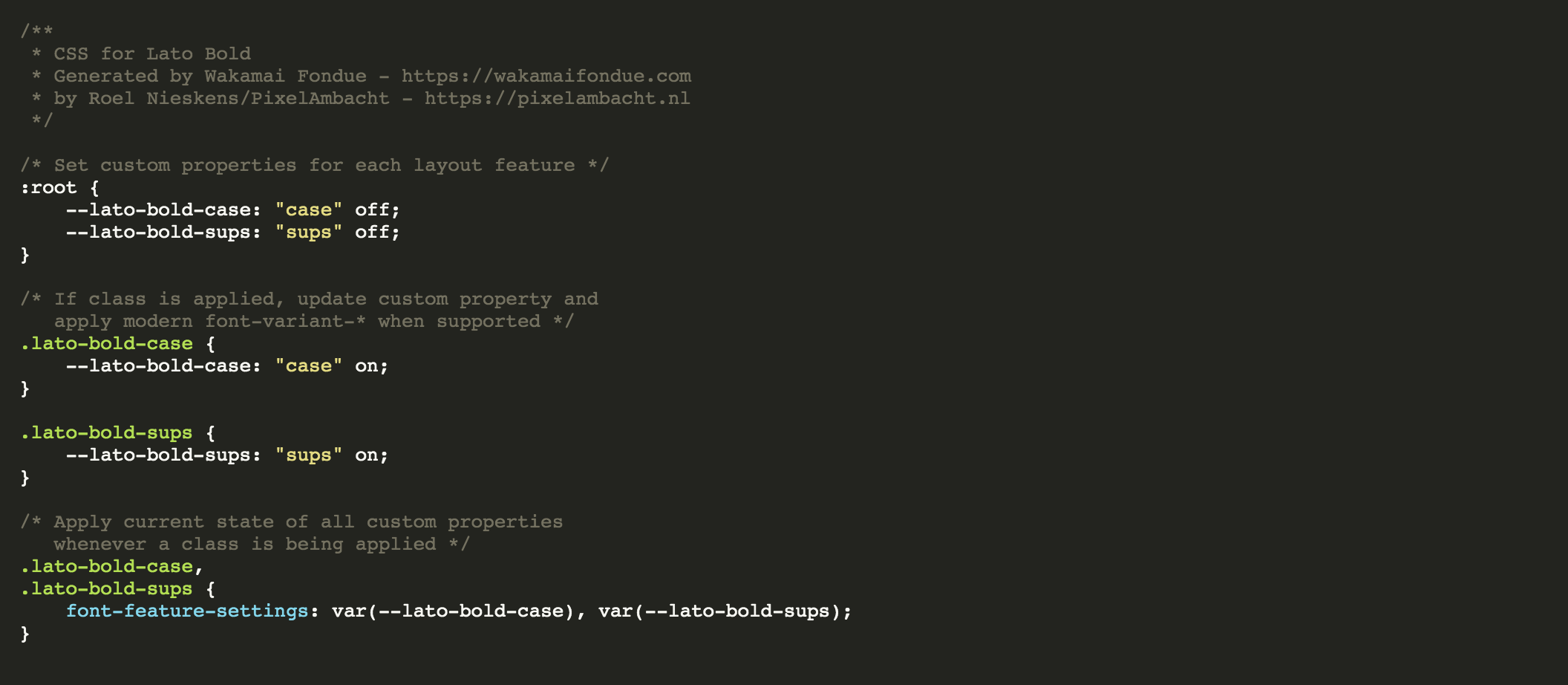
<div class="language-css highlighter-rouge"><div class="highlight"><pre class="highlight"><code><span class="c">/* Set custom properties for each layout feature */</span>
<span class="nd">:root</span> <span class="p">{</span>
    <span class="py">--recursive-sans-linear-light-aalt</span><span class="p">:</span> <span class="s1">"aalt"</span> <span class="n">off</span><span class="p">;</span>
    <span class="py">--recursive-sans-linear-light-afrc</span><span class="p">:</span> <span class="s1">"afrc"</span> <span class="n">off</span><span class="p">;</span>
    <span class="py">--recursive-sans-linear-light-case</span><span class="p">:</span> <span class="s1">"case"</span> <span class="n">off</span><span class="p">;</span>
    <span class="py">--recursive-sans-linear-light-dlig</span><span class="p">:</span> <span class="s1">"dlig"</span> <span class="n">off</span><span class="p">;</span>
    <span class="py">--recursive-sans-linear-light-dnom</span><span class="p">:</span> <span class="s1">"dnom"</span> <span class="n">off</span><span class="p">;</span>
    <span class="py">--recursive-sans-linear-light-frac</span><span class="p">:</span> <span class="s1">"frac"</span> <span class="n">off</span><span class="p">;</span>
    <span class="py">--recursive-sans-linear-light-numr</span><span class="p">:</span> <span class="s1">"numr"</span> <span class="n">off</span><span class="p">;</span>
    <span class="py">--recursive-sans-linear-light-ordn</span><span class="p">:</span> <span class="s1">"ordn"</span> <span class="n">off</span><span class="p">;</span>
    <span class="py">--recursive-sans-linear-light-pnum</span><span class="p">:</span> <span class="s1">"pnum"</span> <span class="n">off</span><span class="p">;</span>
    <span class="py">--recursive-sans-linear-light-sinf</span><span class="p">:</span> <span class="s1">"sinf"</span> <span class="n">off</span><span class="p">;</span>
    <span class="py">--recursive-sans-linear-light-ss01</span><span class="p">:</span> <span class="s1">"ss01"</span> <span class="n">off</span><span class="p">;</span>
    <span class="py">--recursive-sans-linear-light-ss02</span><span class="p">:</span> <span class="s1">"ss02"</span> <span class="n">off</span><span class="p">;</span>
    <span class="py">--recursive-sans-linear-light-ss03</span><span class="p">:</span> <span class="s1">"ss03"</span> <span class="n">off</span><span class="p">;</span>
    <span class="py">--recursive-sans-linear-light-ss04</span><span class="p">:</span> <span class="s1">"ss04"</span> <span class="n">off</span><span class="p">;</span>
    <span class="py">--recursive-sans-linear-light-ss05</span><span class="p">:</span> <span class="s1">"ss05"</span> <span class="n">off</span><span class="p">;</span>
    <span class="py">--recursive-sans-linear-light-ss06</span><span class="p">:</span> <span class="s1">"ss06"</span> <span class="n">off</span><span class="p">;</span>
    <span class="py">--recursive-sans-linear-light-ss07</span><span class="p">:</span> <span class="s1">"ss07"</span> <span class="n">off</span><span class="p">;</span>
    <span class="py">--recursive-sans-linear-light-ss08</span><span class="p">:</span> <span class="s1">"ss08"</span> <span class="n">off</span><span class="p">;</span>
    <span class="py">--recursive-sans-linear-light-ss09</span><span class="p">:</span> <span class="s1">"ss09"</span> <span class="n">off</span><span class="p">;</span>
    <span class="py">--recursive-sans-linear-light-ss10</span><span class="p">:</span> <span class="s1">"ss10"</span> <span class="n">off</span><span class="p">;</span>
    <span class="py">--recursive-sans-linear-light-ss11</span><span class="p">:</span> <span class="s1">"ss11"</span> <span class="n">off</span><span class="p">;</span>
    <span class="py">--recursive-sans-linear-light-ss12</span><span class="p">:</span> <span class="s1">"ss12"</span> <span class="n">off</span><span class="p">;</span>
    <span class="py">--recursive-sans-linear-light-ss20</span><span class="p">:</span> <span class="s1">"ss20"</span> <span class="n">off</span><span class="p">;</span>
    <span class="py">--recursive-sans-linear-light-sups</span><span class="p">:</span> <span class="s1">"sups"</span> <span class="n">off</span><span class="p">;</span>
    <span class="py">--recursive-sans-linear-light-titl</span><span class="p">:</span> <span class="s1">"titl"</span> <span class="n">off</span><span class="p">;</span>
    <span class="py">--recursive-sans-linear-light-zero</span><span class="p">:</span> <span class="s1">"zero"</span> <span class="n">off</span><span class="p">;</span>
<span class="p">}</span>
</code></pre></div></div>

<p>And then provide CSS to turn each feature on. For some features, we prefer the more modern CSS in an <code class="language-plaintext highlighter-rouge">@supports</code> rule. Here’s the (snipped) code:</p>

<div class="language-css highlighter-rouge"><div class="highlight"><pre class="highlight"><code><span class="c">/* If class is applied, update custom property and
   apply modern font-variant-* when supported */</span>
<span class="nc">.recursive-sans-linear-light-aalt</span> <span class="p">{</span>
    <span class="py">--recursive-sans-linear-light-aalt</span><span class="p">:</span> <span class="s1">"aalt"</span> <span class="n">on</span><span class="p">;</span>
<span class="p">}</span>

<span class="nc">.recursive-sans-linear-light-afrc</span> <span class="p">{</span>
    <span class="py">--recursive-sans-linear-light-afrc</span><span class="p">:</span> <span class="s1">"afrc"</span> <span class="n">on</span><span class="p">;</span>
<span class="p">}</span>

<span class="k">@supports</span> <span class="p">(</span><span class="n">font-variant-numeric</span><span class="p">:</span> <span class="n">stacked-fractions</span><span class="p">)</span> <span class="p">{</span>
    <span class="nc">.recursive-sans-linear-light-afrc</span> <span class="p">{</span>
        <span class="py">--recursive-sans-linear-light-afrc</span><span class="p">:</span> <span class="s1">"____"</span><span class="p">;</span>
        <span class="nl">font-variant-numeric</span><span class="p">:</span> <span class="n">stacked-fractions</span><span class="p">;</span>
    <span class="p">}</span>
<span class="p">}</span>

<span class="nc">.recursive-sans-linear-light-case</span> <span class="p">{</span>
    <span class="py">--recursive-sans-linear-light-case</span><span class="p">:</span> <span class="s1">"case"</span> <span class="n">on</span><span class="p">;</span>
<span class="p">}</span>

<span class="nc">.recursive-sans-linear-light-dlig</span> <span class="p">{</span>
    <span class="py">--recursive-sans-linear-light-dlig</span><span class="p">:</span> <span class="s1">"dlig"</span> <span class="n">on</span><span class="p">;</span>
<span class="p">}</span>

<span class="c">/* ...snip... */</span>

<span class="nc">.recursive-sans-linear-light-zero</span> <span class="p">{</span>
    <span class="py">--recursive-sans-linear-light-zero</span><span class="p">:</span> <span class="s1">"zero"</span> <span class="n">on</span><span class="p">;</span>
<span class="p">}</span>

<span class="k">@supports</span> <span class="p">(</span><span class="n">font-variant-numeric</span><span class="p">:</span> <span class="n">slashed-zero</span><span class="p">)</span> <span class="p">{</span>
    <span class="nc">.recursive-sans-linear-light-zero</span> <span class="p">{</span>
        <span class="py">--recursive-sans-linear-light-zero</span><span class="p">:</span> <span class="s1">"____"</span><span class="p">;</span>
        <span class="nl">font-variant-numeric</span><span class="p">:</span> <span class="n">slashed-zero</span><span class="p">;</span>
    <span class="p">}</span>
<span class="p">}</span>
</code></pre></div></div>

<p>Finally, there’s some CSS to actually apply the requested features without losing any previously set features. Thanks, WFIPFM™!</p>

<div class="language-css highlighter-rouge"><div class="highlight"><pre class="highlight"><code><span class="c">/* Apply current state of all custom properties
   whenever a class is being applied */</span>
<span class="nc">.recursive-sans-linear-light-aalt</span><span class="o">,</span>
<span class="nc">.recursive-sans-linear-light-afrc</span><span class="o">,</span>
<span class="nc">.recursive-sans-linear-light-case</span><span class="o">,</span>
<span class="nc">.recursive-sans-linear-light-dlig</span><span class="o">,</span>
<span class="nc">.recursive-sans-linear-light-dnom</span><span class="o">,</span>
<span class="nc">.recursive-sans-linear-light-frac</span><span class="o">,</span>
<span class="nc">.recursive-sans-linear-light-numr</span><span class="o">,</span>
<span class="nc">.recursive-sans-linear-light-ordn</span><span class="o">,</span>
<span class="nc">.recursive-sans-linear-light-pnum</span><span class="o">,</span>
<span class="nc">.recursive-sans-linear-light-sinf</span><span class="o">,</span>
<span class="nc">.recursive-sans-linear-light-ss01</span><span class="o">,</span>
<span class="nc">.recursive-sans-linear-light-ss02</span><span class="o">,</span>
<span class="nc">.recursive-sans-linear-light-ss03</span><span class="o">,</span>
<span class="nc">.recursive-sans-linear-light-ss04</span><span class="o">,</span>
<span class="nc">.recursive-sans-linear-light-ss05</span><span class="o">,</span>
<span class="nc">.recursive-sans-linear-light-ss06</span><span class="o">,</span>
<span class="nc">.recursive-sans-linear-light-ss07</span><span class="o">,</span>
<span class="nc">.recursive-sans-linear-light-ss08</span><span class="o">,</span>
<span class="nc">.recursive-sans-linear-light-ss09</span><span class="o">,</span>
<span class="nc">.recursive-sans-linear-light-ss10</span><span class="o">,</span>
<span class="nc">.recursive-sans-linear-light-ss11</span><span class="o">,</span>
<span class="nc">.recursive-sans-linear-light-ss12</span><span class="o">,</span>
<span class="nc">.recursive-sans-linear-light-ss20</span><span class="o">,</span>
<span class="nc">.recursive-sans-linear-light-sups</span><span class="o">,</span>
<span class="nc">.recursive-sans-linear-light-titl</span><span class="o">,</span>
<span class="nc">.recursive-sans-linear-light-zero</span> <span class="p">{</span>
    <span class="nl">font-feature-settings</span><span class="p">:</span> <span class="n">var</span><span class="p">(</span><span class="n">--recursive-sans-linear-light-aalt</span><span class="p">),</span> <span class="n">var</span><span class="p">(</span><span class="n">--recursive-sans-linear-light-afrc</span><span class="p">),</span>
        <span class="n">var</span><span class="p">(</span><span class="n">--recursive-sans-linear-light-case</span><span class="p">),</span> <span class="n">var</span><span class="p">(</span><span class="n">--recursive-sans-linear-light-dlig</span><span class="p">),</span> <span class="n">var</span><span class="p">(</span><span class="n">--recursive-sans-linear-light-dnom</span><span class="p">),</span>
        <span class="n">var</span><span class="p">(</span><span class="n">--recursive-sans-linear-light-frac</span><span class="p">),</span> <span class="n">var</span><span class="p">(</span><span class="n">--recursive-sans-linear-light-numr</span><span class="p">),</span> <span class="n">var</span><span class="p">(</span><span class="n">--recursive-sans-linear-light-ordn</span><span class="p">),</span>
        <span class="n">var</span><span class="p">(</span><span class="n">--recursive-sans-linear-light-pnum</span><span class="p">),</span> <span class="n">var</span><span class="p">(</span><span class="n">--recursive-sans-linear-light-sinf</span><span class="p">),</span> <span class="n">var</span><span class="p">(</span><span class="n">--recursive-sans-linear-light-ss01</span><span class="p">),</span>
        <span class="n">var</span><span class="p">(</span><span class="n">--recursive-sans-linear-light-ss02</span><span class="p">),</span> <span class="n">var</span><span class="p">(</span><span class="n">--recursive-sans-linear-light-ss03</span><span class="p">),</span> <span class="n">var</span><span class="p">(</span><span class="n">--recursive-sans-linear-light-ss04</span><span class="p">),</span>
        <span class="n">var</span><span class="p">(</span><span class="n">--recursive-sans-linear-light-ss05</span><span class="p">),</span> <span class="n">var</span><span class="p">(</span><span class="n">--recursive-sans-linear-light-ss06</span><span class="p">),</span> <span class="n">var</span><span class="p">(</span><span class="n">--recursive-sans-linear-light-ss07</span><span class="p">),</span>
        <span class="n">var</span><span class="p">(</span><span class="n">--recursive-sans-linear-light-ss08</span><span class="p">),</span> <span class="n">var</span><span class="p">(</span><span class="n">--recursive-sans-linear-light-ss09</span><span class="p">),</span> <span class="n">var</span><span class="p">(</span><span class="n">--recursive-sans-linear-light-ss10</span><span class="p">),</span>
        <span class="n">var</span><span class="p">(</span><span class="n">--recursive-sans-linear-light-ss11</span><span class="p">),</span> <span class="n">var</span><span class="p">(</span><span class="n">--recursive-sans-linear-light-ss12</span><span class="p">),</span> <span class="n">var</span><span class="p">(</span><span class="n">--recursive-sans-linear-light-ss20</span><span class="p">),</span>
        <span class="n">var</span><span class="p">(</span><span class="n">--recursive-sans-linear-light-sups</span><span class="p">),</span> <span class="n">var</span><span class="p">(</span><span class="n">--recursive-sans-linear-light-titl</span><span class="p">),</span> <span class="n">var</span><span class="p">(</span><span class="n">--recursive-sans-linear-light-zero</span><span class="p">);</span>
<span class="p">}</span>
</code></pre></div></div>

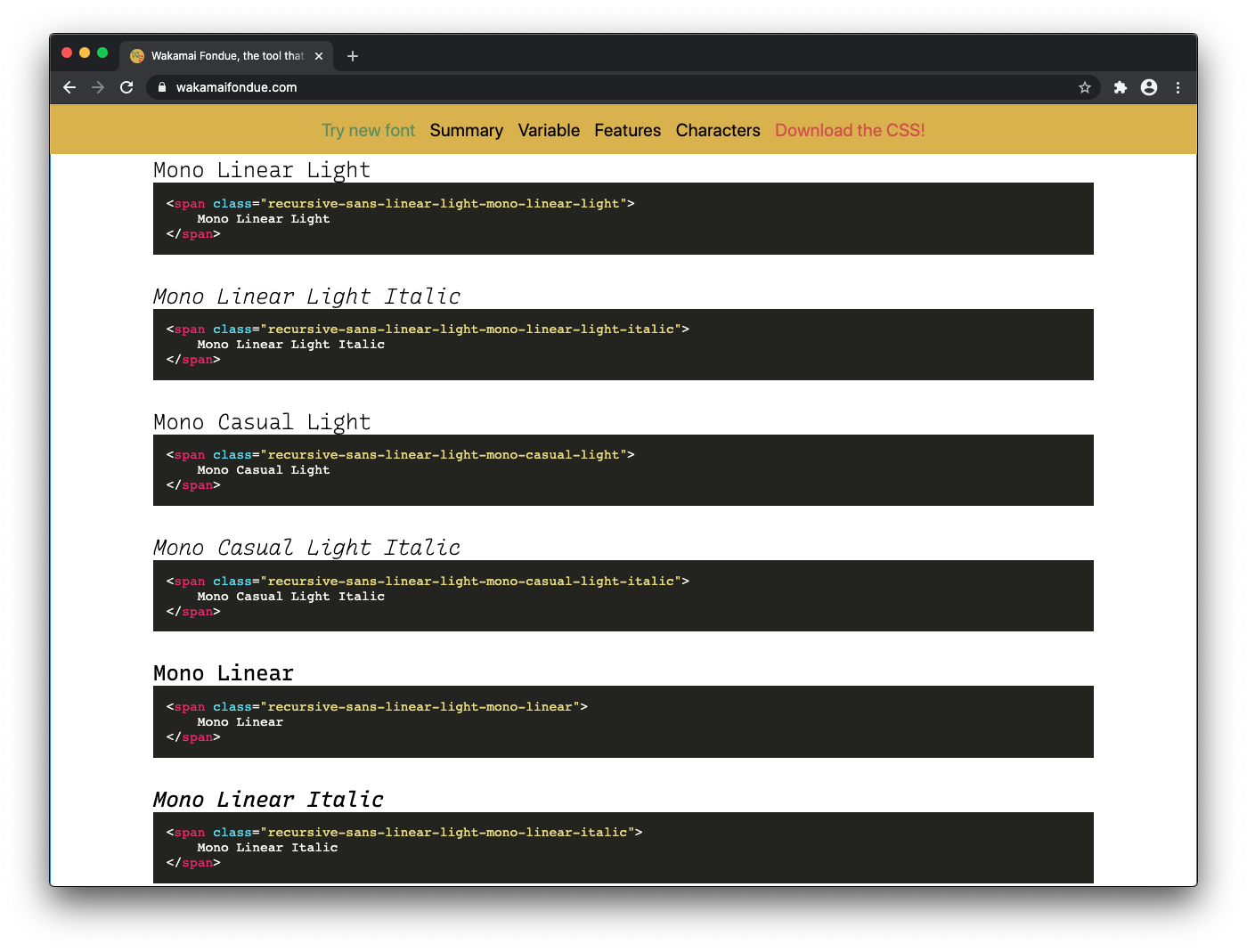
<p>Wakamai Fondue currently generates CSS for all the named instances in the font. This way you can use classes to get the instance you want!</p>

<div class="language-css highlighter-rouge"><div class="highlight"><pre class="highlight"><code><span class="c">/* Variable instances */</span>
<span class="nc">.recursive-sans-linear-light-mono-linear-light</span> <span class="p">{</span>
    <span class="py">font-variation-settings</span><span class="p">:</span> <span class="s1">"MONO"</span> <span class="m">1</span><span class="p">,</span> <span class="s1">"CASL"</span> <span class="m">0</span><span class="p">,</span> <span class="s1">"wght"</span> <span class="m">300</span><span class="p">,</span> <span class="s1">"slnt"</span> <span class="m">0</span><span class="p">,</span>
        <span class="s1">"CRSV"</span> <span class="m">0.501</span><span class="p">;</span>
<span class="p">}</span>

<span class="nc">.recursive-sans-linear-light-mono-linear-light-italic</span> <span class="p">{</span>
    <span class="py">font-variation-settings</span><span class="p">:</span> <span class="s1">"MONO"</span> <span class="m">1</span><span class="p">,</span> <span class="s1">"CASL"</span> <span class="m">0</span><span class="p">,</span> <span class="s1">"wght"</span> <span class="m">300</span><span class="p">,</span> <span class="s1">"slnt"</span> <span class="m">-15</span><span class="p">,</span>
        <span class="s1">"CRSV"</span> <span class="m">1</span><span class="p">;</span>
<span class="p">}</span>

<span class="nc">.recursive-sans-linear-light-mono-casual-light</span> <span class="p">{</span>
    <span class="py">font-variation-settings</span><span class="p">:</span> <span class="s1">"MONO"</span> <span class="m">1</span><span class="p">,</span> <span class="s1">"CASL"</span> <span class="m">1</span><span class="p">,</span> <span class="s1">"wght"</span> <span class="m">300</span><span class="p">,</span> <span class="s1">"slnt"</span> <span class="m">0</span><span class="p">,</span>
        <span class="s1">"CRSV"</span> <span class="m">0.501</span><span class="p">;</span>
<span class="p">}</span>

<span class="nc">.recursive-sans-linear-light-mono-casual-light-italic</span> <span class="p">{</span>
    <span class="py">font-variation-settings</span><span class="p">:</span> <span class="s1">"MONO"</span> <span class="m">1</span><span class="p">,</span> <span class="s1">"CASL"</span> <span class="m">1</span><span class="p">,</span> <span class="s1">"wght"</span> <span class="m">300</span><span class="p">,</span> <span class="s1">"slnt"</span> <span class="m">-15</span><span class="p">,</span>
        <span class="s1">"CRSV"</span> <span class="m">1</span><span class="p">;</span>
<span class="p">}</span>

<span class="c">/* ...snip... */</span>

<span class="nc">.recursive-sans-linear-light-sans-linear-extrablack-italic</span> <span class="p">{</span>
    <span class="py">font-variation-settings</span><span class="p">:</span> <span class="s1">"MONO"</span> <span class="m">0</span><span class="p">,</span> <span class="s1">"CASL"</span> <span class="m">0</span><span class="p">,</span> <span class="s1">"wght"</span> <span class="m">1000</span><span class="p">,</span> <span class="s1">"slnt"</span> <span class="m">-15</span><span class="p">,</span>
        <span class="s1">"CRSV"</span> <span class="m">1</span><span class="p">;</span>
<span class="p">}</span>

<span class="nc">.recursive-sans-linear-light-sans-casual-extrablack</span> <span class="p">{</span>
    <span class="py">font-variation-settings</span><span class="p">:</span> <span class="s1">"MONO"</span> <span class="m">0</span><span class="p">,</span> <span class="s1">"CASL"</span> <span class="m">1</span><span class="p">,</span> <span class="s1">"wght"</span> <span class="m">1000</span><span class="p">,</span> <span class="s1">"slnt"</span> <span class="m">0</span><span class="p">,</span>
        <span class="s1">"CRSV"</span> <span class="m">0.501</span><span class="p">;</span>
<span class="p">}</span>

<span class="nc">.recursive-sans-linear-light-sans-casual-extrablack-italic</span> <span class="p">{</span>
    <span class="py">font-variation-settings</span><span class="p">:</span> <span class="s1">"MONO"</span> <span class="m">0</span><span class="p">,</span> <span class="s1">"CASL"</span> <span class="m">1</span><span class="p">,</span> <span class="s1">"wght"</span> <span class="m">1000</span><span class="p">,</span> <span class="s1">"slnt"</span> <span class="m">-15</span><span class="p">,</span>
        <span class="s1">"CRSV"</span> <span class="m">1</span><span class="p">;</span>
<span class="p">}</span>
</code></pre></div></div>

<h2 id="never-write-a-single-byte-of-font-css-yourself">Never write a single byte of font CSS yourself!</h2>

<p>Never say never, they say. But I hope you will put the Wakamai Fondue command line robot to work, and just have it do your work for you.</p>

<p>The Wakamai Fondue engine will be expanded and improved over the coming months, adding support for controlling individual axes (as opposed to “just” using named instances), more modern CSS <code class="language-plaintext highlighter-rouge">@supports</code> rules, and new modern high tech CSS for upcoming features, like the <a href="https://twitter.com/PixelAmbacht/status/1349829933686775812">font metrics override descriptors</a>.</p>

<p>Find more information on the <a href="https://www.npmjs.com/package/@wakamai-fondue/cli">NPM page</a> or the <a href="https://github.com/Wakamai-Fondue/">Github repos</a>. That’s where we work on Wakamai Fondue. Special shout out to fellow Kabisian <a href="https://twitter.com/_pascalw">Pascal Widdershoven</a> for his amazing JavaScript wrangling skills and creating this CLI tool for all of us to use!</p>

<p>And if the command line isn’t your thing, just head to the <a href="https://wakamaifondue.com/beta">Wakamai Fondue (beta)</a> and use the fondue from the leisure of your browser window!</p>]]></content><author><name></name></author><category term="wakamai" /><category term="fondue," /><category term="css," /><category term="cli" /><summary type="html"><![CDATA[Did you know? Wakamai Fondue is also command line tool! You can use it to generate all the CSS for all your fonts. No need to head over to the website, drag’n’drop your font, click the “Download stylesheet” button, save the file, and all that hassle. Just type wakamai-fondue -c MyFont.woff2 and the CSS will flood your terminal window! Bleep bloop!]]></summary></entry><entry><title type="html">Dev diary #003: Sprechen sie Wakamai Fondue?</title><link href="https://pixelambacht.nl/2020/dev-diary-003/" rel="alternate" type="text/html" title="Dev diary #003: Sprechen sie Wakamai Fondue?" /><published>2020-08-03T02:00:00+02:00</published><updated>2020-08-03T02:00:00+02:00</updated><id>https://pixelambacht.nl/2020/dev-diary-003</id><content type="html" xml:base="https://pixelambacht.nl/2020/dev-diary-003/"><![CDATA[<p>I’m about to have some time off, so this week was about prepping everything for <em>after</em> the time off. On the tech side this was all relatively straightforward: more fine-tuning of existing Wakamai Fondue UI components. We’re now able to offer a <a href="https://github.com/Wakamai-Fondue/wakamai-fondue-site/commit/3b70c7bc2c1b7c3f1fde86e8e1041d48c1587d2a">demo font</a> so you can try out Wakamai Fondue without having to hunt down a font on your own computer. Yay!</p>

<figure>
    <video controls="" loop="" autoplay="" muted="" width="100%">
        <source src="/img/bungee.mp4" type="video/mp4" />
        Sorry, your browser doesn't support embedded videos.
    </video>
    <figcaption>
      See what Wakamai Fondue does with the click of a button!
    </figcaption>
</figure>

<h2 id="abstraction-layer">Abstraction layer</h2>

<p>My Kabisa colleagues Jorg Nieberg and <a href="https://twitter.com/_pascalw">Pascal Widdershoven</a> worked on the abstraction layer between the raw font data, and the human readable data we want to present in the website. The raw data provided by an engine like <a href="https://github.com/foliojs/fontkit">Fontkit</a> or <a href="https://github.com/Pomax/Font.js">Font.js</a> contains a lot of information that is directly usable, like which characters are in the font. But it also provides a list of OpenType features, which is presented as a simple list of four-letter tags. The abstraction layer enriches this list with a human readable name for the feature, if it’s required or optional features, etc.</p>

<p>When this is ready (enough) we’ll start using it on the site, and the Wakamai Fondue stack will be complete (enough) for some super early testing and extensive prototyping!</p>

<h2 id="languages-schmanguages">Languages schmanguages</h2>

<p>When starting Wakamai Fondue I had a simple idea of how to find out which languages are supported by a font. Just take a list of characters that “belong” to a language, see if they’re in the font, and if so: that language is <em>supported!</em></p>

<p>Turns out, language support is quite a rabbit hole, and it goes deep. Simply checking which characters (or Unicode codepoints) are in the font is not enough. Different glyphs might be used for different languages. For instance, you might want a capital I <em>with a dot</em> for Turkish, as explained in <a href="https://glyphsapp.com/tutorials/localize-your-font-turkish">this Glyphs tutorial</a>. If it’s missing, you could argue that the font doesn’t fully support Turkish.</p>

<p>“Full support” is another fuzzy concept in languages. Maybe it’s okay if the font doesn’t have a symbol that’s unlikely to be used. For instance, the currency symbols of pre-euro Europe. If I ran a Dutch website, it’d be totally fine with a font with the ƒ (“Dutch Florin Symbol”) missing. Unless of course the site would be something like <a href="http://DutchCheesePricesThroughoutHistory.com">DutchCheesePricesThroughoutHistory.com</a>, in which case I’d either want the ƒ in the font, or don’t mind it being taken care of by the fallback font.</p>

<p>(I actually have no idea if the current font on my site supports this character. I’ll find out after posting this!) (EDIT: it doesn’t)</p>

<p>I’d love to hear what <em>you</em> would expect from Wakamai Fondue’s language detection system. Let me hear in <a href="https://github.com/Wakamai-Fondue/wakamai-fondue/issues/10">this</a> or <a href="https://github.com/Wakamai-Fondue/wakamai-fondue/issues/17">this</a> issue!</p>

<h2 id="but-first">But first!</h2>

<p>And with all that on my mind, COVID-19 stress too, planet Earth falling apart into a thousand burning pieces of radioactive llama shit, I think I’m off for a vacation break. I hope to see you on the other side, where we’re gonna hook up Wakamai Fondue to it’s engine and get to actually try it out!</p>]]></content><author><name></name></author><category term="wakamai" /><category term="fondue" /><summary type="html"><![CDATA[I’m about to have some time off, so this week was about prepping everything for after the time off. On the tech side this was all relatively straightforward: more fine-tuning of existing Wakamai Fondue UI components. We’re now able to offer a demo font so you can try out Wakamai Fondue without having to hunt down a font on your own computer. Yay!]]></summary></entry><entry><title type="html">Dev diary #002: Scaffolding and figuring outing</title><link href="https://pixelambacht.nl/2020/dev-diary-002/" rel="alternate" type="text/html" title="Dev diary #002: Scaffolding and figuring outing" /><published>2020-07-06T02:00:00+02:00</published><updated>2020-07-06T02:00:00+02:00</updated><id>https://pixelambacht.nl/2020/dev-diary-002</id><content type="html" xml:base="https://pixelambacht.nl/2020/dev-diary-002/"><![CDATA[<p>This week was about covering more groundwork: fleshing out the website, and working on the underlying engine. This is that magic moment where the codebase is devoid of legacy, TODOs and cut corners. Not surprisingly, as it also doesn’t contain a lot of code.</p>

<p>But that changed quickly! After setting up a fresh new Vue project, I started scaffolding and porting over all the components that make up Wakamai Fondue. It’s all based on dummy data so I don’t have to rely on the underlying engine to provide me with actual font data.</p>

<p>In order to warm up I decided the first feature should be the one that has been most requested: drop a font <em>anywhere</em> on the page. In the old Wakamai Fondue you could only do that on the header, requiring you to scroll up all the time. Well, not anymore!</p>

<figure>
    <video controls="" loop="" autoplay="" muted="" width="100%">
        <source src="/img/drop.mp4" type="video/mp4" />
        Sorry, your browser doesn't support embedded videos.
    </video>
    <figcaption>
      Drag and drop fonts anywhere!
    </figcaption>
</figure>

<h2 id="to-html-or-not-to-html">To HTML or not to HTML</h2>

<p>I left out all the HTML examples. They weren’t really helpful and cluttered up the page. I want to bring them back in a more useful way, and I’m considering a few ideas:</p>

<ol>
  <li>Show HTML examples in the CSS part</li>
  <li>Don’t show HTML examples, and make the classes in the generated CSS speak for themselves</li>
  <li>Some kind of sitewide “Toggle HTML examples” button to turn the HTML/CSS example on or off</li>
</ol>

<figure>
  <img src="/img/wf-instances-old.png" alt="" class="center-img stretch-img" />
  <figcaption>
    Old Wakamai Fondue list of named instances
  </figcaption>
</figure>

<p>The second option would be cleanest, as it would save a lot of space taken up by something that’s just a tag with a class containing some unrelated sample text. Gets repetitive if you show this for 64 named instances…</p>

<h2 id="named-instances">Named Instances</h2>

<p>Taking about those: how to show them in Wakamai Fondue? The old Wakamai Fondue shows them in a dropdown with the tester, and later on renders each name in the style of that instance. I’m not happy with both approaches: the dropdown hides the names of the instances, and it’s cumbersome to flip through all of them. The big list (again with superfluous HTML examples) is very long.</p>

<p>The primary focus should be discoverability: which ones are there, how are they called, how do they look. My current plan is to simply dump the named instances in the order they appear in the font, and not intervene with grouping based on axes values (e.g. group all instances with a weight of 200) or instance name parsing (e.g. group all instances with the word “mono” in them). This doesn’t seem very robust and it’d be a lucky guess if that’d result in logical grouping for any font.</p>

<p>I asked for advice <a href="https://twitter.com/PixelAmbacht/status/1278617415254003719">on Twitter</a> and the comments were incredibly helpful. (Be sure to click random timestamps, “x more replies” buttons etc. as Twitter hides a lot of replies in their unhelpful approach of threading.)</p>

<p>A few interesting ideas from that Twitter thread:</p>

<ul>
  <li><a href="https://github.com/Wakamai-Fondue/wakamai-fondue/issues/27">Highlight</a> any named instance that’s close to the current slider settings. This would help you “snap” to a predefined named instance instead of using a custom instance.</li>
  <li>Show a mini sample of the named instance inside the button, so you know what you’re going to get — <a href="https://twitter.com/ArrowType/status/1278683144405815297">Recursive style!</a></li>
  <li>Use the <code class="language-plaintext highlighter-rouge">STAT</code> table to group named instances.</li>
</ul>

<p>I got <a href="https://twitter.com/pgconstable/status/1278851938516267008">pointed to</a> the <code class="language-plaintext highlighter-rouge">STAT</code> table: a table where type designers can indicate the desired order of axes, for instance for UIs. This sounds like it’d have logical grouping/ordering. But I currently don’t fully grok the <code class="language-plaintext highlighter-rouge">STAT</code> table (not <a href="https://twitter.com/letterror/status/1278624814027231232">everyone</a> does) so let’s first run some experiments. But using the <code class="language-plaintext highlighter-rouge">STAT</code> table seems to be the <a href="https://twitter.com/TiroTypeworks/status/1279078201155653634">way</a> <a href="https://twitter.com/adamtwar/status/1279052566253486083">forward</a>.</p>

<p>All in all, a simple question turned into an interesting discussion (even touching upon <a href="https://twitter.com/adamtwar/status/1279431735575564290">music theory</a>) and I’m thankful for all the insights. Now, let’s build some UI!</p>]]></content><author><name></name></author><category term="wakamai" /><category term="fondue" /><summary type="html"><![CDATA[This week was about covering more groundwork: fleshing out the website, and working on the underlying engine. This is that magic moment where the codebase is devoid of legacy, TODOs and cut corners. Not surprisingly, as it also doesn’t contain a lot of code.]]></summary></entry><entry><title type="html">Dev diary #001: Hello world, Wakamai Fondue?</title><link href="https://pixelambacht.nl/2020/dev-diary-001-hello-world/" rel="alternate" type="text/html" title="Dev diary #001: Hello world, Wakamai Fondue?" /><published>2020-06-30T02:00:00+02:00</published><updated>2020-06-30T02:00:00+02:00</updated><id>https://pixelambacht.nl/2020/dev-diary-001-hello-world</id><content type="html" xml:base="https://pixelambacht.nl/2020/dev-diary-001-hello-world/"><![CDATA[<p>Today’s the day! My little nugget of news about Wakamai Fondue <a href="https://twitter.com/PixelAmbacht/status/1276426756480778240">went public</a>. I’m still walking on clouds over this. I get to work on my favorite project, improving it <em>and</em> making it open source!</p>

<p>Apart from some minor touch-ups right after its release in April 2018, I hadn’t touched the codebase. Since then I had collected great feedback, found some bugs – but nothing urgent. With Real Life™ containtly in the way, I never got round to it.</p>

<p>Then I got to talk to Dave Crossland at Google Fonts, who saw the value that Wakamai Fondue brings to font folks and web devs as it is used in the QA workflow when adding and updating fonts in the Google Fonts library. He secured a budget for me to work on Wakamai Fondue through my employer, <a href="https://www.kabisa.nl/">Kabisa</a>. Long story short, this means Real Life™ now means working on Wakamai Fondue <em>at work!</em></p>

<p>Also, I’ve always wanted to keep a dev diary, so here that is.</p>

<p>So, a quick intro to the old dev stack: when I built Wakamai Fondue, it was an experiment in both <a href="https://github.com/foliojs/fontkit">Fontkit</a> and <a href="https://vuejs.org/">Vue.js</a>. As things go with experimental prototype mock-ups, it ended up as the basis for the entire finished product and went straight to production. Warts and all. I wanted to Ship It™, so I cut some corners here and there or went for a few hacky solutions, all to prevent another project stranding on the last 5%. That worked, and v0.9 got out there and got plenty of use.</p>

<p>The new stack will be a fresh Vue.js project, with all of the old components manually cleaned up and ported over. This’ll be rather straightforward. The thing that’ll get a big overhaul is the “engine”. This is the thing that analyses the font, and makes the report possible. Fontkit does a great job, but is a little bloated for WF’s purpose. So we’re likely moving to <a href="https://github.com/Pomax/Font.js">Font.js</a> which looks to be a perfect fit for a tool like Wakamai Fondue. I’ll go into more detail in upcoming posts.</p>

<p>The new site is still in a very early stage, and not functional, but you can check it out <a href="https://github.com/Wakamai-Fondue/wakamai-fondue-site/">on Github</a>. We’ll soon hook up the engine soon so you can actually try out the new site. Because of my awesome Github skills, <a href="https://github.com/Wakamai-Fondue/wakamai-fondue/issues">issues</a> are in a different repo for now, but will be consolidated. Please have a look and add issues, questions or suggestions!</p>

<p>Really excited and curious to see if there’s any participation <em>while</em> working on V1.0!</p>]]></content><author><name></name></author><category term="wakamai" /><category term="fondue" /><summary type="html"><![CDATA[Today’s the day! My little nugget of news about Wakamai Fondue went public. I’m still walking on clouds over this. I get to work on my favorite project, improving it and making it open source!]]></summary></entry><entry><title type="html">Boiling eggs and fixing the variable font inheritance problem</title><link href="https://pixelambacht.nl/2019/fixing-variable-font-inheritance/" rel="alternate" type="text/html" title="Boiling eggs and fixing the variable font inheritance problem" /><published>2019-10-25T02:00:00+02:00</published><updated>2019-10-25T02:00:00+02:00</updated><id>https://pixelambacht.nl/2019/fixing-variable-font-inheritance</id><content type="html" xml:base="https://pixelambacht.nl/2019/fixing-variable-font-inheritance/"><![CDATA[<p>For this post we need the following ingredients:</p>

<ol>
  <li>An imaginary webpage that explains how to boil an egg.</li>
  <li>An imaginary variable font called Cackleberry. It has two axis: weight (<code class="language-plaintext highlighter-rouge">wght</code>) and slant (<code class="language-plaintext highlighter-rouge">slnt</code>). The weight axis goes from 100 to 900, and has a default of 100. Slant goes from 0 to -14, and has a default of 0.</li>
</ol>

<p>With this <em>mise en place</em> out of the way, let’s dive in!</p>

<div class="note">
I wrote a less verbose version of this post if you're short on time: <a href="/2022/boiled-down-fixing-variable-font-inheritance/">Boiled down: fixing the variable font inheritance problem</a>!
</div>

<h2 id="variable-fonts-in-css">Variable fonts in CSS</h2>

<p>To work with variable font axes in CSS, you use the <code class="language-plaintext highlighter-rouge">font-variation-settings</code> property. For instance, to set the weight axis to 666 for everything on the page, you’d write something like this:</p>

<figure class="highlight"><pre><code class="language-css" data-lang="css"><span class="nt">body</span> <span class="p">{</span>
    <span class="nl">font-family</span><span class="p">:</span> <span class="n">Cackleberry</span><span class="p">;</span>
    <span class="py">font-variation-settings</span><span class="p">:</span> <span class="s1">"wght"</span> <span class="m">666</span><span class="p">;</span>
<span class="p">}</span></code></pre></figure>

<p>This trickles down to every element on the page, like you’d expect:</p>

<figure class="highlight"><pre><code class="language-html" data-lang="html"><span class="nt">&lt;body&gt;</span>
    <span class="nt">&lt;h1&gt;</span>How to boil an egg<span class="nt">&lt;/h1&gt;</span>
    <span class="nt">&lt;p&gt;</span>
        Boiling an egg might sound complicated. And
        it is! I mean, look at these steps:
    <span class="nt">&lt;/p&gt;</span>
    <span class="nt">&lt;ol&gt;</span>
        <span class="nt">&lt;li&gt;</span>Put egg in pot with water<span class="nt">&lt;/li&gt;</span>
        <span class="nt">&lt;li&gt;</span>Boil the water for a while<span class="nt">&lt;/li&gt;</span>
    <span class="nt">&lt;ol&gt;</span>
<span class="nt">&lt;/body&gt;</span></code></pre></figure>

<p>All the text inside the <code class="language-plaintext highlighter-rouge">h1</code>, the <code class="language-plaintext highlighter-rouge">p</code>, and the <code class="language-plaintext highlighter-rouge">li</code> elements now have a font weight of 666 instead of the default 100.</p>

<p>So far, so good! Look at this beaut:</p>

<figure>
  <img class="content-width" src="/img/egg-ok.png" alt="Screenshot of fake egg boiling site" />
</figure>

<h2 id="the-inheritance-problem">The inheritance problem</h2>

<p>Now, a common culinary cock-up in boiling an egg is that people forget to put water in the pot. Since the presence of water is vital to boiling, let’s stress this fact:</p>

<figure class="highlight"><pre><code class="language-html" data-lang="html"><span class="nt">&lt;body&gt;</span>
    <span class="nt">&lt;h1&gt;</span>How to boil an egg<span class="nt">&lt;/h1&gt;</span>
    <span class="nt">&lt;p&gt;</span>
        Boiling an egg might sound complicated. And
        it is! I mean, look at these steps:
    <span class="nt">&lt;/p&gt;</span>
    <span class="nt">&lt;ol&gt;</span>
        <span class="nt">&lt;li&gt;</span>Put egg in pot <span class="nt">&lt;em&gt;</span>with water<span class="nt">&lt;/em&gt;&lt;/li&gt;</span> <span class="c">&lt;!-- Stressed! --&gt;</span>
        <span class="nt">&lt;li&gt;</span>Boil the water for a while<span class="nt">&lt;/li&gt;</span>
    <span class="nt">&lt;ol&gt;</span>
<span class="nt">&lt;/body&gt;</span></code></pre></figure>

<p>Nice! The “with water” part is now wrapped in <code class="language-plaintext highlighter-rouge">em</code> tags. Let’s make the font super italic-y by setting the slant axis (<code class="language-plaintext highlighter-rouge">slnt</code>) to the maximum of -14 instead of the default 0:</p>

<figure class="highlight"><pre><code class="language-css" data-lang="css"><span class="nt">body</span> <span class="p">{</span>
    <span class="nl">font-family</span><span class="p">:</span> <span class="n">Cackleberry</span><span class="p">;</span>
    <span class="py">font-variation-settings</span><span class="p">:</span> <span class="s1">"wght"</span> <span class="m">666</span><span class="p">;</span>
<span class="p">}</span>

<span class="nt">em</span> <span class="p">{</span>
    <span class="py">font-variation-settings</span><span class="p">:</span> <span class="s1">"slnt"</span> <span class="m">-14</span><span class="p">;</span>
<span class="p">}</span></code></pre></figure>

<p>Let’s refresh and admire our work:</p>

<figure>
  <img class="content-width" src="/img/egg-ko.png" alt="Screenshot of fake egg boiling site in wrong font" />
</figure>

<p>Oh no! What happened to the weight of 666 inside our <code class="language-plaintext highlighter-rouge">em</code> tags?! It’s gone, reset back to the default of 100. The slant is correct, but the font is all skinny!</p>

<p>We stumbled upon the inheritance problem.</p>

<h2 id="whats-going-on-then">What’s going on then?</h2>

<p>The problem is this: whenever setting a value for <code class="language-plaintext highlighter-rouge">font-variation-settings</code>, the values <em>you don’t set</em> get reset back to their defaults. Because we don’t set the <code class="language-plaintext highlighter-rouge">wght</code> to 666 in our <code class="language-plaintext highlighter-rouge">em</code> tag, the browser will use the default of 100 when rendering font.</p>

<p>In effect, we have created this CSS:</p>

<figure class="highlight"><pre><code class="language-css" data-lang="css"><span class="nt">body</span> <span class="p">{</span>
    <span class="nl">font-family</span><span class="p">:</span> <span class="n">Cackleberry</span><span class="p">;</span>
    <span class="py">font-variation-settings</span><span class="p">:</span> <span class="s1">"wght"</span> <span class="m">666</span><span class="p">,</span> <span class="s1">"slnt"</span> <span class="m">0</span><span class="p">;</span>
<span class="p">}</span>

<span class="nt">em</span> <span class="p">{</span>
    <span class="py">font-variation-settings</span><span class="p">:</span> <span class="s1">"wght"</span> <span class="m">0</span><span class="p">,</span> <span class="s1">"slnt"</span> <span class="m">-14</span><span class="p">;</span>
<span class="p">}</span></code></pre></figure>

<p>Okay, that’s annoying, but easy to fix. In this case, we could just set the proper <code class="language-plaintext highlighter-rouge">wght</code> <em>and</em> <code class="language-plaintext highlighter-rouge">slnt</code> for our <code class="language-plaintext highlighter-rouge">em</code> tag:</p>

<figure class="highlight"><pre><code class="language-css" data-lang="css"><span class="nt">body</span> <span class="p">{</span>
    <span class="nl">font-family</span><span class="p">:</span> <span class="n">Cackleberry</span><span class="p">;</span>
    <span class="py">font-variation-settings</span><span class="p">:</span> <span class="s1">"wght"</span> <span class="m">666</span><span class="p">;</span>
<span class="p">}</span>

<span class="nt">em</span> <span class="p">{</span>
    <span class="py">font-variation-settings</span><span class="p">:</span> <span class="s1">"wght"</span> <span class="m">666</span><span class="p">,</span> <span class="s1">"slnt"</span> <span class="m">-14</span><span class="p">;</span>
<span class="p">}</span></code></pre></figure>

<p>Problem solved, for now:</p>

<figure>
  <img class="content-width" src="/img/egg-ok2.png" alt="Screenshot of fake egg boiling site" />
</figure>

<p>Our current CSS is small and simple. But still we already have a duplicated value. The more variations of our font we’ll add, the more exceptions and combinations we’ll have to write. This’ll turn into maintenance hell really quickly!</p>

<h2 id="cascading-cackleberry">Cascading Cackleberry</h2>

<p>You know what cascades really well, though? CSS custom properties, also known as CSS variables! What if instead of setting <code class="language-plaintext highlighter-rouge">font-features-settings</code> directly, we use CSS variables?</p>

<p>Let’s create a basic setup:</p>

<figure class="highlight"><pre><code class="language-css" data-lang="css"><span class="nd">:root</span> <span class="p">{</span>
    <span class="py">--cackleberry-wght</span><span class="p">:</span> <span class="m">100</span><span class="p">;</span>
    <span class="py">--cackleberry-slnt</span><span class="p">:</span> <span class="m">0</span><span class="p">;</span>
<span class="p">}</span>

<span class="o">*</span> <span class="p">{</span>
    <span class="py">font-variation-settings</span><span class="p">:</span> <span class="s1">"wght"</span> <span class="n">var</span><span class="p">(</span><span class="n">--cackleberry-wght</span><span class="p">),</span>
                             <span class="s1">"slnt"</span> <span class="n">var</span><span class="p">(</span><span class="n">--cackleberry-slnt</span><span class="p">);</span>
<span class="p">}</span>

<span class="nt">body</span> <span class="p">{</span>
    <span class="nl">font-family</span><span class="p">:</span> <span class="n">Cackleberry</span><span class="p">;</span>
    <span class="py">--cackleberry-wght</span><span class="p">:</span> <span class="m">666</span><span class="p">;</span>
<span class="p">}</span>

<span class="nt">em</span> <span class="p">{</span>
    <span class="py">--cackleberry-slnt</span><span class="p">:</span> <span class="m">-14</span><span class="p">;</span>
<span class="p">}</span></code></pre></figure>

<p>What’s going on here? Let’s parse this CSS:</p>

<p>First we create unique variables for each axis, and set them to their default values. We do this on the <code class="language-plaintext highlighter-rouge">:root</code> element so these values will trickle down to every other element on the page.</p>

<p>We then apply these CSS variables to the axes of Cackleberry. All axes, at the same time! We do this on the <code class="language-plaintext highlighter-rouge">*</code> element, so it will be applied to every element on the page. If Cackleberry gets applied to that element too, it will get the proper <code class="language-plaintext highlighter-rouge">font-variation-settings</code>, and render as intended.</p>

<p>We now arrive at our <code class="language-plaintext highlighter-rouge">body</code> styles. Since <code class="language-plaintext highlighter-rouge">body</code> inherits from <code class="language-plaintext highlighter-rouge">:root</code>, it will get all of <code class="language-plaintext highlighter-rouge">:root</code>’s CSS applied <em>as well</em>. So in effect the CSS for <code class="language-plaintext highlighter-rouge">body</code> is:</p>

<figure class="highlight"><pre><code class="language-css" data-lang="css"><span class="nt">body</span> <span class="p">{</span>
    <span class="c">/* Inherited from :root ----------------------------- */</span>

    <span class="py">--cackleberry-wght</span><span class="p">:</span> <span class="m">100</span><span class="p">;</span> <span class="c">/* Will get overridden */</span>
    <span class="py">--cackleberry-slnt</span><span class="p">:</span> <span class="m">0</span><span class="p">;</span>

    <span class="c">/* Applied through * selector ----------------------- */</span>

    <span class="py">font-variation-settings</span><span class="p">:</span> <span class="s1">"wght"</span> <span class="n">var</span><span class="p">(</span><span class="n">--cackleberry-wght</span><span class="p">),</span>
                             <span class="s1">"slnt"</span> <span class="n">var</span><span class="p">(</span><span class="n">--cackleberry-slnt</span><span class="p">);</span>

    <span class="c">/* Direct styles for body --------------------------- */</span>

    <span class="nl">font-family</span><span class="p">:</span> <span class="n">Cackleberry</span><span class="p">;</span>
    <span class="py">--cackleberry-wght</span><span class="p">:</span> <span class="m">666</span><span class="p">;</span> <span class="c">/* Overrides the default value */</span>
<span class="p">}</span></code></pre></figure>

<p>Since <code class="language-plaintext highlighter-rouge">--cackleberry-wght: 666</code> is applied to <code class="language-plaintext highlighter-rouge">body</code> directly, it overrides the value we inherit from <code class="language-plaintext highlighter-rouge">:root</code>. This means that the values fed to the <code class="language-plaintext highlighter-rouge">font-variation-settings</code> rule are now: <code class="language-plaintext highlighter-rouge">"wght" 666, "slnt" 0</code>.</p>

<p>So far so good. We’re now at the same point of our first example: the entire page gets rendered in Cackleberry in <code class="language-plaintext highlighter-rouge">wght</code> 666.</p>

<p>But here’s where it gets interesting, the styles for the <code class="language-plaintext highlighter-rouge">em</code> element:</p>

<figure class="highlight"><pre><code class="language-css" data-lang="css"><span class="nt">em</span> <span class="p">{</span>
    <span class="py">--cackleberry-slnt</span><span class="p">:</span> <span class="m">-14</span><span class="p">;</span>
<span class="p">}</span></code></pre></figure>

<p>Again, instead of setting <code class="language-plaintext highlighter-rouge">font-variation-settings</code> directly, we set our custom CSS variable for the <code class="language-plaintext highlighter-rouge">slnt</code> axis. The other values cascade down from above, and are not affected. That’s significant! Because if we would’ve set <code class="language-plaintext highlighter-rouge">font-variation-settings</code>, they <em>would</em> have been affected by being reset back to their defaults.</p>

<p>Effectively, the CSS for <code class="language-plaintext highlighter-rouge">em</code> now looks like this:</p>

<figure class="highlight"><pre><code class="language-css" data-lang="css"><span class="nt">em</span> <span class="p">{</span>
    <span class="c">/* Inherited from :root and body -------------------- */</span>

    <span class="py">--cackleberry-wght</span><span class="p">:</span> <span class="m">666</span><span class="p">;</span> <span class="c">/* Inherited from body */</span>
    <span class="py">--cackleberry-slnt</span><span class="p">:</span> <span class="m">0</span><span class="p">;</span>  <span class="c">/* Will get overridden */</span>

    <span class="c">/* Applied through * selector ----------------------- */</span>

    <span class="py">font-variation-settings</span><span class="p">:</span> <span class="s1">"wght"</span> <span class="n">var</span><span class="p">(</span><span class="n">--cackleberry-wght</span><span class="p">),</span>
                             <span class="s1">"slnt"</span> <span class="n">var</span><span class="p">(</span><span class="n">--cackleberry-slnt</span><span class="p">);</span>

    <span class="c">/* Direct styles for em ----------------------------- */</span>

    <span class="py">--cackleberry-slnt</span><span class="p">:</span> <span class="m">-14</span><span class="p">;</span> <span class="c">/* Overrides the default value */</span>
<span class="p">}</span></code></pre></figure>

<p>So when that <code class="language-plaintext highlighter-rouge">font-variation-settings</code> rule gets applied to <code class="language-plaintext highlighter-rouge">em</code>, the values will be equivalent to this:</p>

<figure class="highlight"><pre><code class="language-css" data-lang="css"><span class="nt">em</span> <span class="p">{</span>
    <span class="py">font-variation-settings</span><span class="p">:</span> <span class="s1">"wght"</span> <span class="m">666</span><span class="p">,</span> <span class="s1">"slnt"</span> <span class="m">-14</span><span class="p">;</span>
<span class="p">}</span></code></pre></figure>

<p>And that’s what we want! Set one value and leave the others at their inherited value, instead of resetting them. No more hard-coded <code class="language-plaintext highlighter-rouge">font-variation-settings</code> values for every single element!</p>

<h2 id="works-for-opentype-features-too">Works for OpenType features too</h2>

<p>This approach works for <code class="language-plaintext highlighter-rouge">font-feature-settings</code> too, the CSS property to tweak OpenType features:</p>

<figure class="highlight"><pre><code class="language-css" data-lang="css"><span class="nd">:root</span> <span class="p">{</span>
    <span class="py">--smcp</span><span class="p">:</span> <span class="n">off</span><span class="p">;</span>
    <span class="py">--ss01</span><span class="p">:</span> <span class="n">off</span><span class="p">;</span>
<span class="p">}</span>

<span class="o">*</span> <span class="p">{</span>
    <span class="nl">font-feature-settings</span><span class="p">:</span> <span class="s1">"smcp"</span> <span class="n">var</span><span class="p">(</span><span class="n">--smcp</span><span class="p">),</span> <span class="s1">"ss01"</span> <span class="n">var</span><span class="p">(</span><span class="n">--ss01</span><span class="p">);</span>
<span class="p">}</span></code></pre></figure>

<p>In this example, small caps (<code class="language-plaintext highlighter-rouge">smcp</code>) and stylistic set #1 (<code class="language-plaintext highlighter-rouge">ss01</code>) are now individually turn-on-and-off-able, without fear of resetting a previously set OpenType feature. If you want to turn on <code class="language-plaintext highlighter-rouge">ss01</code> and leave <code class="language-plaintext highlighter-rouge">smcp</code> at whatever it was, you can do:</p>

<figure class="highlight"><pre><code class="language-css" data-lang="css"><span class="nt">div</span> <span class="p">{</span>
    <span class="py">--ss01</span><span class="p">:</span> <span class="n">on</span><span class="p">;</span>
<span class="p">}</span></code></pre></figure>

<h2 id="wakamai-fondue">Wakamai Fondue?</h2>

<p>If you’re using <a href="https://wakamaifondue.com">Wakamai Fondue</a> to inspect your fonts, you might have already seen this trick in use:</p>

<figure class="large-content-width">
  <img src="/img/wf-css-var-example.png" alt="" />
  <figcaption>
    Generated CSS for Lato's OpenType features
  </figcaption>
</figure>

<p>Wakamai Fondue analyses any font you drop in the site, and spits out all the CSS you need to tweak variable axes and OpenType features, using the CSS variable hack.</p>

<p>Note that Wakamai Fondue uses a slightly different approach than our examples, by generating classes for each feature. You can just add the class for the feature you want to any HTML element, and the CSS will do the rest:</p>

<figure class="highlight"><pre><code class="language-css" data-lang="css"><span class="nc">.cackleberry-smcp</span> <span class="p">{</span>
    <span class="py">--cackleberry-smcp</span><span class="p">:</span> <span class="s1">"smcp"</span> <span class="n">on</span><span class="p">;</span>
<span class="p">}</span></code></pre></figure>

<p>To better explain what’s going on, Wakamai Fondue also puts the feature name (<code class="language-plaintext highlighter-rouge">smcp</code> in this example) in the variable, instead of just <code class="language-plaintext highlighter-rouge">on</code> or <code class="language-plaintext highlighter-rouge">off</code>.</p>

<p>The effect is the same: this specific feature/axis is set, the rest is left at their inherited value, instead of being overwritten. Any element with the class <code class="language-plaintext highlighter-rouge">cackleberry-smcp</code> will get small caps. Great!</p>

<h2 id="registered-axes-and-font-variant">Registered axes and font-variant</h2>

<p>To demonstrate this trick I’ve been using the <code class="language-plaintext highlighter-rouge">wght</code> and <code class="language-plaintext highlighter-rouge">slnt</code> axes here, but these <a href="https://developer.mozilla.org/en-US/docs/Web/CSS/font-variation-settings#Registered_and_custom_axes">registered axes</a> are really meant to be set through <code class="language-plaintext highlighter-rouge">font-weight</code> and <code class="language-plaintext highlighter-rouge">font-style</code>. Same goes for the small caps example up here: these are best set with <code class="language-plaintext highlighter-rouge">font-variant-caps</code>. Only when this isn’t supported you should fall back to low-level properties like <code class="language-plaintext highlighter-rouge">font-variation-settings</code> and <code class="language-plaintext highlighter-rouge">font-feature-settings.</code></p>

<h2 id="eggs-are-done">Eggs are done!</h2>

<p>I think this is a nice way to circumvent the inheritance problem with <code class="language-plaintext highlighter-rouge">font-variation-settings</code> and <code class="language-plaintext highlighter-rouge">font-feature-settings</code>. It works in every browser were variable fonts are supported, as they’ll also support CSS variables.</p>

<p>Some care should be taken when you have multiple variable fonts, as you probably want to be a bit more specific with which elements get the variable-infused <code class="language-plaintext highlighter-rouge">font-variation-settings</code> rule applied.</p>

<p>I hope this trick helps you make awesome variable font sites! And perfectly boiled eggs.</p>

<div class="note">Thanks to <a href="https://twitter.com/ThunderNixon">Stephen Nixon</a> for <a href="https://www.recursive.design/">Recursive</a>, used in the Cackleberry screenshots! Also thanks to Stephen, Bram Stein and Scott Kellum for valuable feedback on the first drafts of this article. 💖</div>]]></content><author><name></name></author><category term="webfonts," /><category term="variable" /><category term="fonts" /><summary type="html"><![CDATA[For this post we need the following ingredients:]]></summary></entry><entry><title type="html">You’ve gotten old, bulletproof @font-face syntax. Time to retire!</title><link href="https://pixelambacht.nl/2019/youve-gotten-old-bulletproof-font-face-syntax/" rel="alternate" type="text/html" title="You’ve gotten old, bulletproof @font-face syntax. Time to retire!" /><published>2019-09-04T02:00:00+02:00</published><updated>2019-09-04T02:00:00+02:00</updated><id>https://pixelambacht.nl/2019/youve-gotten-old-bulletproof-font-face-syntax</id><content type="html" xml:base="https://pixelambacht.nl/2019/youve-gotten-old-bulletproof-font-face-syntax/"><![CDATA[<p>2009 — the year Michael Jackson died, Obama became president of the USA, and Avatar hit the silver screen.</p>

<p>Kanye West told Taylor Swift <a href="https://www.youtube.com/watch?v=1z8gCZ7zpsQ">“I’mma let you finish”</a>, David asked <a href="https://www.youtube.com/watch?v=txqiwrbYGrs">“is this real life”</a> after a trip to the dentist, and Susan Boyle’s <a href="https://www.youtube.com/watch?v=RxPZh4AnWyk">audition</a> on Britain’s Got Talent became an internet video phenomenon.</p>

<div class="center stretch-img"><iframe width="560" height="315" src="https://www.youtube-nocookie.com/embed/oavMtUWDBTM" frameborder="0" allow="accelerometer; autoplay; encrypted-media; gyroscope; picture-in-picture" allowfullscreen=""></iframe></div>
<p><em class="caption">And we all got the Trololo earworm</em></p>

<p>Nokia still ruled the mobile phone market. Apple’s iPhones, released two years prior and now running iPhone OS 3, held just 13.7% of the market. Android, with version 1.6 (nicknamed Donut) held a mere 2.8%.</p>

<p>Emoji wouldn’t come to these phones for another couple of years.</p>

<p>iPads and other tablets were not even on the horizon yet. Netbooks, specifically the Eee PC, were the summit of mobile computing.</p>

<p>We surfed the web with Chrome 3.0, IE8, Firefox 3.5 and Safari 4. Our computers were being asked if they <a href="https://knowyourmeme.com/memes/but-can-it-run-crysis">could run Crysis</a>.</p>

<p>Support for webfonts had just grown from Internet Explorer’s proprietary EOT format to TTF and OTF in Firefox, Safari and Opera. The WOFF format was still being drafted by Jonathan Kew, Tal Leming, and Erik van Blokland.</p>

<h2 id="the-bulletproof-font-face-syntax-is-born">The bulletproof @font-face syntax is born</h2>

<p>It was around that time when <a href="https://twitter.com/paul_irish">Paul Irish</a> tried to make sense of all these different formats, and introduced the <a href="https://www.paulirish.com/2009/bulletproof-font-face-implementation-syntax/">bulletproof @font-face syntax</a>. This little snippet of code tried to make sense of all the various formats, bugs, quirks and scattered support. It provided for IE6 users, by then a browser that was already 8 years old. It explained how to turn on @font-face support in Chrome’s dev builds. It treated WOFF as the futuristic new font format is was back then. WOFF2 isn’t even mentioned at all.</p>

<figure class="large-content-width">
  <img src="/img/screenshots-2009.jpg" alt="Screesnhots of Fox News, Netflix, Twitter and YouTube in 2009" />
  <figcaption>
    The way the web looked back in '09
  </figcaption>
</figure>

<p>But time ticks by, and now it’s 2019. The bulletproof @font-face syntax is celebrating its 10th year. It’s a decade old.</p>

<p>WOFF2 has superseded the once futuristic WOFF, and has been supported by major browsers for many years.</p>

<p>The group of people using antiquated hardware running crippled OSes and severely outdated browsers that need EOT, OTF/TTF or SVG fonts is so minuscule, that forcing webfonts on them feels inconsiderate instead of helpful. Maybe there’s accessibility or performance issues to be solved instead!</p>

<p>In 2019, your font loading strategy is better off by include a great fallback stack. Even in modern times, in evergreen browsers on spectacularly powerful devices, fonts can fail to load. Your visitors will be grateful to still be able to read your content — whether their train just entered a tunnel or they’re surfing on a decade old beige PC running Windows XP.</p>

<h2 id="thank-you-bulletproof-font-face-syntax">Thank you, bulletproof @font-face syntax</h2>

<p>Thanks for providing us with a robust snippet when the webfont days were wild, support was super sketchy, and we needed some help getting to get our awesome webfonts to work. You’ve been a great little blob of CSS. But you’re 10 years old – that’s <em>ancient</em> in internet years!</p>

<p>Today, WOFF2 with WOFF as fallback, combined with a thoughtful fallback font stack, <a href="https://www.zachleat.com/web/retire-bulletproof-syntax/">respectfully take your place</a> in the web developer’s toolkit.</p>

<p>You’ve gotten old, bulletproof @font-face syntax. Time to retire!</p>]]></content><author><name></name></author><category term="webfonts" /><summary type="html"><![CDATA[2009 — the year Michael Jackson died, Obama became president of the USA, and Avatar hit the silver screen.]]></summary></entry><entry><title type="html">Creating Fontself Catapult, a color font publishing platform</title><link href="https://pixelambacht.nl/2019/fontself-catapult-color-font-platform/" rel="alternate" type="text/html" title="Creating Fontself Catapult, a color font publishing platform" /><published>2019-01-18T01:00:00+01:00</published><updated>2019-01-18T01:00:00+01:00</updated><id>https://pixelambacht.nl/2019/fontself-catapult-color-font-platform</id><content type="html" xml:base="https://pixelambacht.nl/2019/fontself-catapult-color-font-platform/"><![CDATA[<p>About a year ago I was contacted by the people from Fontself, a software company from France and early adopters of color fonts, to work on a new project. They already had Fontself Maker, a tool to create fonts from the comfort of Adobe Illustrator, and were planning to add a new service to help designers publish their fonts on the web. The intersection of webfonts and color fonts is of course exactly my sweet spot, so when they asked me to help out I said “oh heck yes!”</p>

<h2 id="what-should-a-font-publishing-tool-do">What should a font publishing tool do?</h2>

<p><a href="https://www.fontself.com/">Fontself Maker</a> as a font design tool was already well established: it converts anything you can create in Illustrator into a font. You draw the letter A, tell Fontself Maker it’s an A, and it magically takes care of creating a font of it. You can save it as an OpenType .OTF file, which you can distribute and use like any other font. It even lets you create color fonts!</p>

<p>The new publishing platform, named <a href="https://www.fontself.com/catapult">Fontself Catapult</a>, was going to be an extension to allow you to publish your font specifically for the web. It wouldn’t just create a WOFF/WOFF2 file, but also offer whitelisting, all the needed HTML and CSS, assistance for various platforms like WordPress or CodePen, and a custom specimen page. Oh, and highly optimised hosting so fonts would be as easy and performant as, say, Google Fonts.</p>

<div class="center stretch-img"><iframe width="854" height="481" src="https://www.youtube.com/embed/cvxN9ejVeJ4" frameborder="0" allow="accelerometer; autoplay; encrypted-media; gyroscope; picture-in-picture" allowfullscreen=""></iframe></div>
<p><em class="caption">A video explaining the what’s what of Fontself Catapult</em></p>

<h2 id="technical-challenges">Technical challenges</h2>

<p>If you build a font publishing and hosting platform for non-technical folks (graphic designer and creatives), there’s a whole list of details you need to get right:</p>

<ul>
  <li>The font should work everywhere, and be optimised and free of bloat and bugs.</li>
  <li>The hosting should be fast, reliable and have a basic defense against abuse and piracy.</li>
  <li>The publishing service should be very easy to use, but also allow fine grained control to advanced users.</li>
</ul>

<p>And because Fontself also allows you to create <a href="https://catapult.fontself.com/public/oqgZEXaGeR4w0YmKW">color fonts</a>, the service has to be extra resilient: there <em>will</em> be users on browsers out there without support for color fonts. With Edge switching to Chromium, they will (hopefully temporarily) lose support for OpenType-SVG, one of the most versatile and interesting color font formats. The designer and the website’s visitors should be treated to a good experience either way.</p>

<h2 id="getting-it-right">Getting it right</h2>

<p>We didn’t want to burden the font designers with too many options when publishing their font, so we needed to decide on some sane defaults.</p>

<p>Consider the font loading strategy. How do we want the browser to handle these fonts? Without knowing the priorities of the websites that are to be built with Fontself fonts, it’s hard to make one-size-fits-all default. For a portfolio site sporting an extravagant display font, it doesn’t make sense to show the text in a fallback font. Because in that case the look and feel, or even the font itself, is more important than the textual content. You’re not there to read about what the quick brown fox is doing — you’re there to see the slick design.</p>

<p>On the other hand, if you’re creating a breaking news site, it’s preposterous to keep users from seeing the content until your font has loaded.</p>

<p>After careful deliberation (the “three days locked up in a basement meeting room in Paris” kind of deliberation), it was decided that, considering the Fontself audience, the font had a high priority and should be on screen as soon as possible.</p>

<p>This resulted in a few decisions:</p>

<ul>
  <li>We ask the browser to keep the text invisible for as long as possible, using <code class="language-plaintext highlighter-rouge">font-display: block</code>, until the font has loaded.</li>
  <li>In the case of color fonts, we educate the designer as best as we can about support, and lack thereof, so they know exactly where their fonts will work.</li>
  <li>No JavaScript; the user should be able to use the fonts through some simple HTML and CSS.</li>
</ul>

<p>This will try to get the font on screen as soon as possible. We basically ask the browser “do everything you can to show the text in <em>our</em> font, and hide the text in the meantime”. On a slower connection, the text will not be shown in a fallback font until the proper font has loaded. The browser will obey this up to a few seconds, after which it’ll overrule our wish and show the text in the fallback font — until the webfont has finally downloaded.</p>

<h2 id="serving-fonts">Serving fonts</h2>

<p>Fonts are served in WOFF2 and WOFF only: legacy formats are not only less relevant by the day, but this service is aimed at the future. We’re relying on modern browser features, both in font loading strategies as color font support, so we use the font format tailored specifically for the web.</p>

<p>Securing webfonts is nearly impossible, but we try to do everything to prevent unlicensed use. Sites that use the font need to be whitelisted, so you can’t just copy the CSS and use it on another site.</p>

<p data-height="499" data-theme-id="0" data-slug-hash="OwgrrX" data-default-tab="result" data-user="fontself" data-pen-title="Gilbert Spiral 16:9" style="height: 499px; box-sizing: border-box; display: flex; align-items: center; justify-content: center; border: 2px solid black; margin: 1em 0; padding: 1em;" class="codepen"><span>See the Pen <a href="https://codepen.io/fontself/pen/OwgrrX/">Gilbert Spiral 16:9</a> by fontself (<a href="https://codepen.io/fontself">@fontself</a>) on <a href="https://codepen.io">CodePen</a>.</span></p>
<script async="" src="https://static.codepen.io/assets/embed/ei.js"></script>

<p><em class="caption">Gilbert Color, created in Fontself Maker and published with Fontself Catapult</em></p>

<h2 id="color-fonts">Color fonts</h2>

<p>Finally, we had to tackle color font support. Fontself has been evangelising color fonts for a long time, and runs <a href="https://www.colorfonts.wtf/">colorfonts.wtf</a>, so it was important to get this right.</p>

<p>Support for color fonts is increasing, and has even expanded beyond browsers to Adobe software and Apple’s operating systems. But there are still browsers out there that don’t support color fonts. What to do with those? Sure, they’ll see the single color “fallback” that’s included inside the font, but is that good enough?</p>

<p>We decided on the following strategy: Catapult will clearly educate the designer about color font support, so they can decide for themselves if this an issue or not. On the live specimen page generated by Catapult, the designer can see per browser which format is supported, and what people will see when they see the fallback. Of course, we’re using <a href="https://pixelambacht.nl/chromacheck/">ChromaCheck</a> to check for browser support.</p>

<p>Besides that, we also decided to warn the user if the generated font would start to get too big for proper web usage. Color fonts don’t necessarily have to be big, but with enough complexity in the letterforms and lots of colors, it’s good to get a heads up when the font is getting fat.</p>

<h2 id="and-then-there-was-light">And then there was light</h2>

<p>We had out battle plan ready, and the Fontself folks picked it up from there. A few months later, <a href="https://www.fontself.com/catapult">Fontself Catapult</a> saw the light of day! 🎉</p>

<p>Personally, this was the first time being involved in an extensive color font project, one that put the creation of fonts in the hands of everyone with access to Illustrator. The project truly went from A to Z: from drawing the characters as you like, to publishing a highly optimised, robust font on the web.</p>

<figure class="large-content-width">
  <img class="shadow-img" src="/img/fontself-catapult-Aires.png" alt="Screenshot of the Fontself Catapult specimen page" />
  <figcaption>
    Example page for a font built with Fontself Catapult
  </figcaption>
</figure>]]></content><author><name></name></author><category term="webfonts" /><summary type="html"><![CDATA[About a year ago I was contacted by the people from Fontself, a software company from France and early adopters of color fonts, to work on a new project. They already had Fontself Maker, a tool to create fonts from the comfort of Adobe Illustrator, and were planning to add a new service to help designers publish their fonts on the web. The intersection of webfonts and color fonts is of course exactly my sweet spot, so when they asked me to help out I said “oh heck yes!”]]></summary></entry></feed>